Forums on Intune, SCCM, and Windows 11

Welcome to the forums. Register a free account today to become a member! Once signed in, you'll be able to participate on this site by adding your topics and posts, as well as connect with other members through your own private inbox!

PENDING After upgrade to Configuration Manager 2107 workstation are now offline

  • Thread starter Thread starter nkerr
  • Start date Start date
  • Replies Replies 27
  • Views Views 14K

nkerr

Active Member
Messages
36
Reaction score
2
Points
8
After upgrade to Configuration Manager 2107 workstation are now offline. There is now a x next to the computer icon. We are able to ping the server from the PCs and the PCs from the server.

I deleted my PC from SCCM. It has shown up again however Device Online Management Point and Device Online from Internet are blank. It also has a question mark next to computer icon.
 
The hotfix was applied last week. Imaging is now working. However the devices are still offline, etc.
 
In ClientIDManagerStartup.log file

<![LOG[RegTask: Failed to send registration request. Error: 0x87d00309]LOG]!><time="13:21:10.299+240" date="11-24-2021" component="ClientIDManagerStartup" context="" type="3" thread="14492" file="regtask.cpp:2419">
<![LOG[[RegTask] - Sleeping for 7680 seconds ...]LOG]!><time="13:21:10.299+240" date="11-24-2021" component="ClientIDManagerStartup" context="" type="1" thread="14492" file="regtask.cpp:2324">
 
DCMAgent.log file

<![LOG[CcmCISdkProvider::EvaluatePassportCertProfiles - Failed to create instance of DCMAgent(0x80080005).]LOG]!><time="11:10:12.403+240" date="11-24-2021" component="DCMAgent" context="" type="3" thread="11912" file="cisdkprovider.cpp:518">
<![LOG[Method EvaluatePassportCertProfiles failed with error code 80080005]LOG]!><time="11:10:12.410+240" date="11-24-2021" component="DCMAgent" context="" type="3" thread="11912" file="cisdkprovider.cpp:4369">

CcmSqlCE.log file
<![LOG[[C:\WINDOWS\CCM\StateMessageStore.sdf] Initialized database session manager, session pool is NOT enabled.]LOG]!><time="03:58:05.307+240" date="11-24-2021" component="CcmSqlCE" context="" type="1" thread="9308" file="sqldb.cpp:389">
<![LOG[Closed database 'C:\WINDOWS\CCM\StateMessageStore.sdf'.]LOG]!><time="03:59:05.130+240" date="11-24-2021" component="CcmSqlCE" context="" type="1" thread="9308" file="sqldb.cpp:480">
 
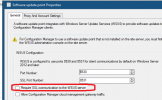
I, too, was having this issue. I followed the suggestion from the Config Manager notifications / insights. One of them was Configure software Update points to use TLS/SSL - which I did here: 1638464427551.png

This was yesterday. When I came in this morning, all of my systems were showing as offline. I went through the normal checks (restart the server - which I realized I didn't do after the hotfix install), and then checked logs, I remembered that I made this one other change. Once I unchecked it again, and waited a few minutes (also manually updated a machine and forced discovery data collection), systems started coming back online. I'm not sure this is going to solve your issue, but it solved mine.

Ron
 
I don’t see the Software update point when I view Servers and Site System Roles. Should it be there?
 
Last edited:

Forum statistics

Threads
7,165
Messages
27,965
Members
18,265
Latest member
MCorra

Trending content

Back
Top