Forums on Intune, SCCM, and Windows 11

Welcome to the forums. Register a free account today to become a member! Once signed in, you'll be able to participate on this site by adding your topics and posts, as well as connect with other members through your own private inbox!

SOLVED Config Manager 1810 Hotfix Rollup KB4488598 FAILURE

  • Thread starter Thread starter iCon27
  • Start date Start date
  • Replies Replies 7
  • Views Views 2K

iCon27

Member
Messages
7
Reaction score
0
Points
1
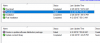
once I start the Pre-req check (Image 726) the ‘Check Status’ for the Hotfix Rollup disappears (Image 727) and searching all drives on the server, I find no current ‘ConfigMgrPrereq.log’ that I can look at (Image 729). If I then go and look at the Status for the previous KB4490434 Hotfix (Image 728), I now show a error on the ‘Replication’ step > ‘Create or Update software distribution package’ that was not there prior to me running the current update and it shows the current date that I just ran the new update pre-req check. Not sure what is going on. The previous update ran with no issue and all steps had green checks for success. Thanks again…
 

Attachments

  • Image 728.png
    Image 728.png
    13.8 KB · Views: 7
  • Image 727.png
    Image 727.png
    9.9 KB · Views: 6
  • Image 726.png
    Image 726.png
    5.5 KB · Views: 7
  • Image 729.png
    Image 729.png
    3.1 KB · Views: 5
Are you sure there is no ConfigMgrPrereq.log on C: drive ?.

Prajwal, There is a log at that location but it is from February and does not update when the new Hotfix is started. Every step is successful from the last update

Currently trying to see if resetting the latest update with the Update Reset Tool will fix the issue.

https://docs.microsoft.com/en-us/sccm/core/servers/manage/update-reset-tool

Tool can be found at "cd.latest>SMSSETUP>TOOLS"
I will update the post once I try the Hotfix again.
 
Prajwal, There is a log at that location but it is from February and does not update when the new Hotfix is started. Every step is successful from the last update

Currently trying to see if resetting the latest update with the Update Reset Tool will fix the issue.

https://docs.microsoft.com/en-us/sccm/core/servers/manage/update-reset-tool

Tool can be found at "cd.latest>SMSSETUP>TOOLS"
I will update the post once I try the Hotfix again.

So far Config Mang. has not pulled the update down after deletion. Will wait and update the post as needed..
 
now I am getting
Site Component Manager failed to reinstall this component on this site system.

Solution: Review the previous status messages to determine the exact reason for the failure. Site Component Manager will automatically retry the reinstallation in 60 minutes. To force Site Component Manager to immediately retry the reinstallation, stop and restart Site Component Manager using the Configuration Manager Service Manager.


Frustrating!! SQL Server 17 - Config Mang. 1810

Reverting VM back to original state before
1810 Hotfix Rollup KB4488598 FAILURE
 
Last edited:
Good day,
I have resolved the issue.

Referenced post - https://codeduet.com/blog/2018/05/2...otstrap-operation-failed-with-error-code-183/

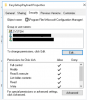
The SYSTEM account was missing from the folder Properties Security tab and I had to add it back.

"$:\Program Files\Microsoft Configuration Manager\EasySetupPayload"

1878

I have also discovered that the LocalHost\Administrators and LocalHost\Users accounts were missing from the root software source folder in the Security tab.
 

Forum statistics

Threads
7,165
Messages
27,965
Members
18,264
Latest member
markmumford

Trending content

Back
Top