Hello All,
I am having trouble with an console/site upgrade in an Air-gap environment. I have baseline 2303 version attempting to go 2309. I used the ServiceConnectionTool.exe to prepare the telemetry data, then used that same SCT on my online MECM environment. I am able to import the data and pass the pre-req check. However it will fail at the install the moment it attempts the 'Install files' section.
Investing the Cmupdate.log shows the following error:
Failed to validate version for file C:\Program Files\Microsoft Configuration Manager\CMUStaging\FD3D0214-F4DC-4664-B6BB-997E381B7C9D\SMSSetup\Client\x64\MMASETUP-AMD64.EXE (E:\program files\microsoft configuration manager\cmuclient\x64\mmasetup-amd64.exe) CONFIGURATION_MANAGER_UPDATE
Failed to install update files.
Failed to apply update changes 0x80004005
Error information persisted in the database.
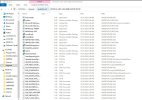
Now when I actually go to that file location I've found the file, but it is 0KB. I digged a little further in and looked into the .cab file in that was contained in prior and that same .exe file is 0KB there as well along with several others(Pic attached). So makes sense it would fail it is trying to install an empty file.
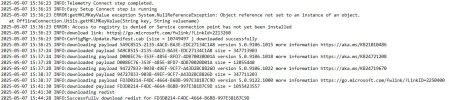
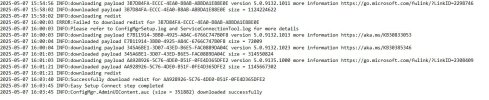
When I looked at the serviceconnetiontool.log (pics attached)i see an error for access to registry denied then 1-2 errors to fail to download redist for the some larger .cab files, however invested the ones with no errors and those still have the files missing.
I've reattempted the download x3 more times and additionally from another machine that is completely outside the environment and it was the same result. I've ensured all the online machines w/ SCT had installed both C++ redistributable, .Net 4.8, & the ODBC Driver 18 for SQL Server (x64) per this article:

I even tried the newer SCT tool included with my updated Online MECM and while there was less 0KB empty files I was still missing some. And the same case when trying to go 2409 & 2503, those GUID .cab files are missing same files.
I am uncertain how else to proceed, has anyone else encountered this?
I am having trouble with an console/site upgrade in an Air-gap environment. I have baseline 2303 version attempting to go 2309. I used the ServiceConnectionTool.exe to prepare the telemetry data, then used that same SCT on my online MECM environment. I am able to import the data and pass the pre-req check. However it will fail at the install the moment it attempts the 'Install files' section.
Investing the Cmupdate.log shows the following error:
Failed to validate version for file C:\Program Files\Microsoft Configuration Manager\CMUStaging\FD3D0214-F4DC-4664-B6BB-997E381B7C9D\SMSSetup\Client\x64\MMASETUP-AMD64.EXE (E:\program files\microsoft configuration manager\cmuclient\x64\mmasetup-amd64.exe) CONFIGURATION_MANAGER_UPDATE
Failed to install update files.
Failed to apply update changes 0x80004005
Error information persisted in the database.
Now when I actually go to that file location I've found the file, but it is 0KB. I digged a little further in and looked into the .cab file in that was contained in prior and that same .exe file is 0KB there as well along with several others(Pic attached). So makes sense it would fail it is trying to install an empty file.
When I looked at the serviceconnetiontool.log (pics attached)i see an error for access to registry denied then 1-2 errors to fail to download redist for the some larger .cab files, however invested the ones with no errors and those still have the files missing.
I've reattempted the download x3 more times and additionally from another machine that is completely outside the environment and it was the same result. I've ensured all the online machines w/ SCT had installed both C++ redistributable, .Net 4.8, & the ODBC Driver 18 for SQL Server (x64) per this article:
Service connection tool - Configuration Manager
Learn about this tool that enables you to connect to the Configuration Manager cloud service to manually upload usage information.
learn.microsoft.com
I even tried the newer SCT tool included with my updated Online MECM and while there was less 0KB empty files I was still missing some. And the same case when trying to go 2409 & 2503, those GUID .cab files are missing same files.
I am uncertain how else to proceed, has anyone else encountered this?