
Hello everybody,
I added all Drivers and created Driver-Packages for all our different Models of Clients.
In the OSD-Task I added at last Step in the Section "Install Operating System" the Step "Apply Drivers automatically" and checked the Options "Install all compatbile Drivers" and "Consider drivers of all categories".
During the OSD-Task it says, that the Drivers are getting installed but unfortunately after the OSD there are Drivers missing.
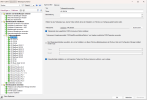
I then created another OSD-Task where I Apply Driver Packages (Query with WMI) for each Model and after that again "Applyy Drivers automatically". But I am still missing Drivers.
The new Task Sequence looks like this (german):
After the OS is installed I added the Drivers from the SCCM-Driverstore-Path via the Device-Manager and everything works fine.
Could somebody help me out and explain to me, why the Drivers won't be installed?
Thanks in advance.
I added all Drivers and created Driver-Packages for all our different Models of Clients.
In the OSD-Task I added at last Step in the Section "Install Operating System" the Step "Apply Drivers automatically" and checked the Options "Install all compatbile Drivers" and "Consider drivers of all categories".
During the OSD-Task it says, that the Drivers are getting installed but unfortunately after the OSD there are Drivers missing.
I then created another OSD-Task where I Apply Driver Packages (Query with WMI) for each Model and after that again "Applyy Drivers automatically". But I am still missing Drivers.
The new Task Sequence looks like this (german):
After the OS is installed I added the Drivers from the SCCM-Driverstore-Path via the Device-Manager and everything works fine.
Could somebody help me out and explain to me, why the Drivers won't be installed?
Thanks in advance.

