eavenhuang
Member
- Messages
- 23
- Solutions
- 3
- Reaction score
- 0
- Points
- 1
Dear Experts,
I've been googling around trying to expand one of our SCCM drives where all content library resides. This has caused issues with our DP and reporting service point and failed for CB update prerequisite check.
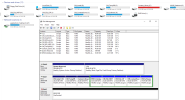
I was advised to expand the drive by changing it from BASIC to DYNAMIC but I'm not sure what is the side effect and any risks of destroying our prod server. I'm also looking for third-party tools like EaseUS but seems they are also offering to change the disk to dynamic
I tried to clean up the content library but it showed me "Approximately 0 bytes would have been freed if this tool was run in delete mode." I was also thinking about initiating a new drive, change it next to G drive, deleting the volume and expand F drive to use the space but that seems very risky in production...
This is our primary site and we have only one Win 2019 server hosting everything including the SQL server. I might also need to expand other drives later but I'm totally lost now
Any help would be really appreciated. Thanks a lot for your assistance in advance.
I've been googling around trying to expand one of our SCCM drives where all content library resides. This has caused issues with our DP and reporting service point and failed for CB update prerequisite check.
I was advised to expand the drive by changing it from BASIC to DYNAMIC but I'm not sure what is the side effect and any risks of destroying our prod server. I'm also looking for third-party tools like EaseUS but seems they are also offering to change the disk to dynamic
I tried to clean up the content library but it showed me "Approximately 0 bytes would have been freed if this tool was run in delete mode." I was also thinking about initiating a new drive, change it next to G drive, deleting the volume and expand F drive to use the space but that seems very risky in production...
This is our primary site and we have only one Win 2019 server hosting everything including the SQL server. I might also need to expand other drives later but I'm totally lost now
Any help would be really appreciated. Thanks a lot for your assistance in advance.