

MJ-Tech
Well-Known Member
- Messages
- 217
- Solutions
- 25
- Reaction score
- 21
- Points
- 18
Dear Team,
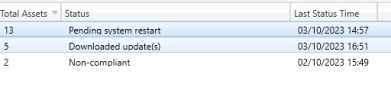
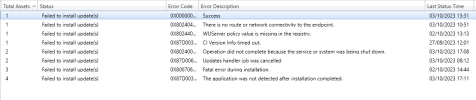
I deployed last month's patches and Dell drivers to our production machines. The drivers were installed on most machines, and the machines were rebooted a few times. However, the SCCM deployment status shows that not all machines are compliant. Some machines have the following statuses: "In progress tab—"Pending system restart," "Downloaded update(s)," "Non-compliant," and "Error tab - Pl refer to the pictures."
I randomly connected to a few machines manually and verified the Software Centre, but I did not see any pending activities on the Updates tab. Could you please help me troubleshoot this issue further?
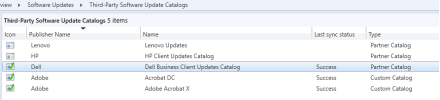
Deployed Dell latest drivers using third-party software update catalogs:
In-Progress:
Error:
I deployed last month's patches and Dell drivers to our production machines. The drivers were installed on most machines, and the machines were rebooted a few times. However, the SCCM deployment status shows that not all machines are compliant. Some machines have the following statuses: "In progress tab—"Pending system restart," "Downloaded update(s)," "Non-compliant," and "Error tab - Pl refer to the pictures."
I randomly connected to a few machines manually and verified the Software Centre, but I did not see any pending activities on the Updates tab. Could you please help me troubleshoot this issue further?
Deployed Dell latest drivers using third-party software update catalogs:
In-Progress:
Error:


