Forums on Intune, SCCM, and Windows 11

Welcome to the forums. Register a free account today to become a member! Once signed in, you'll be able to participate on this site by adding your topics and posts, as well as connect with other members through your own private inbox!

PENDING error when deploying an application with sccm

  • Thread starter Thread starter AngelVLC82
  • Start date Start date
  • Replies Replies 8
  • Views Views 9K

AngelVLC82

Member
Messages
11
Reaction score
0
Points
1
Hello, I am trying to deploy from a SCCM server in domain A, to a client that is in domain B, this client has the agent installed pointing to the SITE of the server that is in domain A.

When I try to launch it, the client detects the software. It appears in the system center software but when it says downloading it stays stuck at 0%.

I have looked in the client's log file and found these messages:

error.jpeg
That the distribution list is empty and that the client does not belong to any boundary.

Obviously I have verified that the DP has the content uploaded and the client belongs to a boundary, and has its boundary group assigned to the DP.

I have set up the same environment in a test environment, without FW or other noise and I get the same result.

I have found some queries to MS, with the same topic and they point out that it may be a problem with the discovery methods that the discovery by AD is deactivated and changed to Network.
I have made the change in my test environment and nothing changes.

Can someone help me, I have no experience with SCCM.
 
Hello, I am trying to deploy from a SCCM server in domain A, to a client that is in domain B, this client has the agent installed pointing to the SITE of the server that is in domain A.

When I try to launch it, the client detects the software. It appears in the system center software but when it says downloading it stays stuck at 0%.

I have looked in the client's log file and found these messages:
View attachment 5581
That the distribution list is empty and that the client does not belong to any boundary.

Obviously I have verified that the DP has the content uploaded and the client belongs to a boundary, and has its boundary group assigned to the DP.

I have set up the same environment in a test environment, without FW or other noise and I get the same result.

I have found some queries to MS, with the same topic and they point out that it may be a problem with the discovery methods that the discovery by AD is deactivated and changed to Network.
I have made the change in my test environment and nothing changes.

Can someone help me, I have no experience with SCCM.
Just send some other normal (small) application and check the logs. Do a Ipconfig and make sure that the same is included in the boundary and that boundary group has a site system server assigned.. Check the client location logs. "Unable to retrieve AD site membership" --> not a good sign. There is also windowsDeliveryOptimization related GPO implemented. Need to check those.
 
I redeployed a small app and it throws the same error.

The problem is the boundaries, I think. I haven't found the solution yet, but I had a poorly created boundary. The boundaries in AD SITE must point to the AD sites, I had one that did not point to the site (it was placed incorrectly)

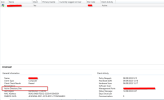
I have gone to discovery methods and I have forced the execution again, I have seen that in the SCCM console in the clients where the deployment does not work, in clients sccm general information active directory site, it appears empty as you can see in the photo
error client.png
I understand that if the boundaries are already fine (I hope so, because I already have 3 boundaries pointing to the 3 AD sites), this information will be reflected in the client, I have forced communication between my PC and the server to see if it updates it .

Is there any method to force it? Or do you just have to be patient?
I hope this is it and the deployment works.
 

Attachments

  • error client.png
    error client.png
    72.4 KB · Views: 8
It is generally Recommend that you use IP Ranges only for your boundaries. IP Ranges are the only boundary type that will be 100% correct all of the time. All others will depend on both AD or the client to be configured correctly.
 
It is generally Recommend that you use IP Ranges only for your boundaries. IP Ranges are the only boundary type that will be 100% correct all of the time. All others will depend on both AD or the client to be configured correctly.
okay, understood.

So my current scenario is the following: Enable Active directory forest discovery, and check that it will generate the boundaries automatically.

Procedure to follow to correct the serious situation:

1. Uncheck the check to generate the boundaries automatically.
2. Delete the automatically created boundaries.
3. Create the boundaries, by IP range

Doubts:
Should I enable Network discovery in the discovery methods? I currently have it disabled

For clients, do I have to do something to get them to update the information or will they do it on their own?

THX!
 
okay, understood.

So my current scenario is the following: Enable Active directory forest discovery, and check that it will generate the boundaries automatically.

Procedure to follow to correct the serious situation:

1. Uncheck the check to generate the boundaries automatically.
2. Delete the automatically created boundaries.
3. Create the boundaries, by IP range

Doubts:
Should I enable Network discovery in the discovery methods? I currently have it disabled

For clients, do I have to do something to get them to update the information or will they do it on their own?

THX!
Nobody using network discovery anymore.
What do you think client will need to get updated?
 
It is generally Recommend that you use IP Ranges only for your boundaries. IP Ranges are the only boundary type that will be 100% correct all of the time. All others will depend on both AD or the client to be configured correctly.
The boundaries were solved, thanks
 
Back
Top