Forums on Intune, SCCM, and Windows 11

Welcome to the forums. Register a free account today to become a member! Once signed in, you'll be able to participate on this site by adding your topics and posts, as well as connect with other members through your own private inbox!

PENDING SMS Site Cannot Access Sql server (2017)

Yousef Ahmed

Member
Messages
7
Solutions
1
Reaction score
1
Points
3
Hi,
SMS Site Cannot Access Sql server (2017)

*** Failed to connect to the SQL Server, connection type: SMS ACCESS. SMS_EXECUTIVE 10/04/2022 11:09:32 5528 (0x1598)
CSiteControlEx::GetCurrentSiteInfo: Failed to get SQL connection SMS_EXECUTIVE 10/04/2022 11:09:32 5528 (0x1598)
CSiteControlEx::GetMasterSCF:Failed to read site information from database, retry in 5 seconds ... SMS_EXECUTIVE 10/04/2022 11:09:32 5528 (0x1598)
*** [HY000][-2146893048][Microsoft][SQL Server Native Client 11.0]SQL Server Network Interfaces: The token supplied to the function is invalid SMS_EXECUTIVE 10/04/2022 11:09:37 5528 (0x1598)
*** [HY000][-2146893048][Microsoft][SQL Server Native Client 11.0]Cannot generate SSPI context SMS_EXECUTIVE 10/04/2022 11:09:37 5528 (0x1598)
*** [HY000][-2146893048][Microsoft][SQL Server Native Client 11.0]SQL Server Network Interfaces: The token supplied to the function is invalid SMS_EXECUTIVE 10/04/2022 11:09:37 5528 (0x1598)
*** [HY000][-2146893048][Microsoft][SQL Server Native Client 11.0]Cannot generate SSPI context SMS_EXECUTIVE 10/04/2022 11:09:37 5528 (0x1598)

Any ideas...
 
What trouble shooting have you do already? Have you look to make sure that SQL is healthy?
Hey garth ,
The proplem have started after i've added on the same SQL instance another Database for VAMT (volume activation management tool)...
i've checked all the permissions also connect the SQL Server remotley successfully
, i've reset the WMI repository also too ...
must to mention that there another proplem that i cannot get the console load properly

after checking some logs that belongs to the SMS Site this what i got ...
 
Hey garth ,
The proplem have started after i've added on the same SQL instance another Database for VAMT (volume activation management tool)...
i've checked all the permissions also connect the SQL Server remotley successfully
, i've reset the WMI repository also too ...
must to mention that there another proplem that i cannot get the console load properly

after checking some logs that belongs to the SMS Site this what i got ...
You didn't answer my questions , Is SQL Healthy? Why did you add a second SQL instance to you site server, why not reuse the existing SQL Instance? What does Resetting WMI Repository mean? (IMO this is a bad thing to do on a CM site server)
 
You didn't answer my questions , Is SQL Healthy? Why did you add a second SQL instance to you site server, why not reuse the existing SQL Instance? What does Resetting WMI Repository mean? (IMO this is a bad thing to do on a CM site
Sorry for misunderstanding ,
after running some diagnostic Tests i got this - Instance IS NULL !!


Untitled.png
 
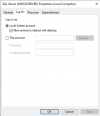
Hi ,

I got successfully the console loaded after changing the user in the log on tab in SQL Server Service

is there an explaination ?

thank you


Screenshot.png
 
Hi ,

I got successfully the console loaded after changing the user in the log on tab in SQL Server Service

is there an explaination ?

thank you


View attachment 4489
Without knowing what was there before there is no way to answer this. I hope you are NOT changing the Service account for SQL using the Services Tool. That is a "no-no".
 
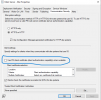
The solution was very easy ,
just unchecked the PKI Client Certificate ,restart the SQL Server and the console was loaded successfuly also the SMS SiteScreenshot.png
 
Last edited:
Solution

Forum statistics

Threads
7,164
Messages
27,963
Members
18,255
Latest member
Robo

Trending content

Back
Top