Forums on Intune, SCCM, and Windows 11

Welcome to the forums. Register a free account today to become a member! Once signed in, you'll be able to participate on this site by adding your topics and posts, as well as connect with other members through your own private inbox!

PENDING Windows 20H2 upgrade fails using SCCM

  • Thread starter Thread starter cinta87
  • Start date Start date
  • Replies Replies 7
  • Views Views 3K

cinta87

Member
Messages
5
Reaction score
0
Points
1
Dear All,
Greetings!!
Where do I check the alerts/logs for the computer's which have been added to 20H2 upgrade collection but failing to get upgraded.
I am new to SCCM, hence your help is appreciated.
 
Dear All,
Greetings!!
Where do I check the alerts/logs for the computer's which have been added to 20H2 upgrade collection but failing to get upgraded.
I am new to SCCM, hence your help is appreciated.
failing to get upgraded could mean anything. Is the Windows 10 20H2 upgrade appearing in the software center?. If yes, when you install, does it upgrade?. If No, what is the error?.
 
I have added the pc's to Collection but only few pc's got upgraded and I can see their status under Monitoring-->TSLaunch Status-->Monitor, However, for the PC's which are not getting upgraded for whatever reason, for these pc's where can I check, why they aren't getting the notification to upgrade or what is causing them not to receive the upgrade package?
Can I login to the user pc and verify, for any error's or it can be done from SCCM itself?

Thank you!!
 
failing to get upgraded could mean anything. Is the Windows 10 20H2 upgrade appearing in the software center?. If yes, when you install, does it upgrade?. If No, what is the error?.
I have added the pc's to Collection but only few pc's got upgraded and I can see their status under Monitoring-->TSLaunch Status-->Monitor, However, for the PC's which are not getting upgraded for whatever reason, for these pc's where can I check, why they aren't getting the notification to upgrade or what is causing them not to receive the upgrade package?
Can I login to the user pc and verify, for any error's or it can be done from SCCM itself?

Thank you!!
 
I have added the pc's to Collection but only few pc's got upgraded and I can see their status under Monitoring-->TSLaunch Status-->Monitor, However, for the PC's which are not getting upgraded for whatever reason, for these pc's where can I check, why they aren't getting the notification to upgrade or what is causing them not to receive the upgrade package?
Can I login to the user pc and verify, for any error's or it can be done from SCCM itself?

Thank you!!
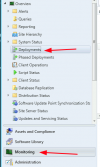
I don't see "TSLaunch Status" on the Monitoring tab. I check on deployment status by going to Monitoring-->Deployments to find information on success/failure of each of our deployments.

1639511219819.png
 
I don't see "TSLaunch Status" on the Monitoring tab. I check on deployment status by going to Monitoring-->Deployments to find information on success/failure of each of our deployments.

View attachment 4140
Thank you for your input.
I have been there earlier, it does show below tabs for that particular deployment, however there there are PC's which are not listed in any of these tabs. Hence my question was, is there a way to see, whether the package is still in progress or was completely downloaded onto the end point?
Success
In Progress
Error
Requirements Not Met
Unknown

Thank you!
 
Thank you for your input.
I have been there earlier, it does show below tabs for that particular deployment, however there there are PC's which are not listed in any of these tabs. Hence my question was, is there a way to see, whether the package is still in progress or was completely downloaded onto the end point?
Success
In Progress
Error
Requirements Not Met
Unknown

Thank you!

Any computers that haven't received the advertisement should be listed in the "Unknown" tab and any in-progress installations should show up in the "In Progress" tab. If there is another way to see the status, I am unaware of it.
 

Forum statistics

Threads
7,165
Messages
27,967
Members
18,270
Latest member
clickclick

Trending content

Back
Top