Forums on Intune, SCCM, and Windows 11

Welcome to the forums. Register a free account today to become a member! Once signed in, you'll be able to participate on this site by adding your topics and posts, as well as connect with other members through your own private inbox!

PENDING Software Center -Installation Failed

  • Thread starter Thread starter imz
  • Start date Start date
  • Replies Replies 6
  • Views Views 6K

imz

Well-Known Member
Messages
55
Reaction score
2
Points
8
Hello Everyone,

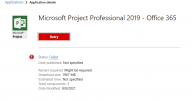
I deployed MS Project 2019, Everything is perfect, the project is available in the software center and also installing properly but after the completion of installation Software Center is saying "Retry, Failed" but MS Project is installed and working.
Please check the attached image. Thanks
 

Attachments

  • Error.PNG
    Error.PNG
    39.2 KB · Views: 7
Check the detection method. Also try refreshing the software center by pressing F5 key and see if the status changes.
 
Detection methods looks ok but it is you who need to confirm if it's correct. I have seen this issue in the past where applications installs correctly but the software center shows the application failed. When you refresh the software center, it shows installed. Check appenforce.log for any errors.
 
Detection methods looks ok but it is you who need to confirm if it's correct. I have seen this issue in the past where applications installs correctly but the software center shows the application failed. When you refresh the software center, it shows installed. Check appenforce.log for any errors.
Hi Prajwal,

The problem is solved with changing detection method from Registry to File System. Now it is working perfectly. Thanks for your response.
 
Detection methods looks ok but it is you who need to confirm if it's correct. I have seen this issue in the past where applications installs correctly but the software center shows the application failed. When you refresh the software center, it shows installed. Check appenforce.log for any errors.
The project installation is done on the new machine but still having problem with the machine where Office 2019 (click to run) is already installed, Which detection method or settings is required for Project 2019 to deploy on that machine
 

Forum statistics

Threads
7,169
Messages
27,980
Members
18,282
Latest member
SirTimbit

Trending content

Back
Top