Forums on Intune, SCCM, and Windows 11

Welcome to the forums. Register a free account today to become a member! Once signed in, you'll be able to participate on this site by adding your topics and posts, as well as connect with other members through your own private inbox!

SOLVED SCCM Software SCAN not updating on some clients

  • Thread starter Thread starter mooez786
  • Start date Start date
  • Replies Replies 6
  • Views Views 9K
Status
Not open for further replies.

mooez786

New Member
Messages
3
Reaction score
0
Points
1
Dear All,

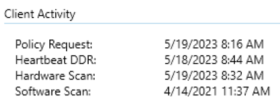
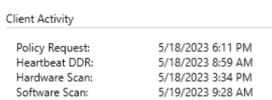
We are facing software scan issue in some of our clients and other client are working properly. Kindly assist in this regard.

1684471945263.png1684472601771.png
 
Dear All,

We are facing software scan issue in some of our clients and other client are working properly. Kindly assist in this regard.

View attachment 5258View attachment 5259
There are many reason for SW scan to not work the biggest issue is, if the SW scan exceeds the 4 hour (run time) limit, it will never return results. You will need to read the logs to confirm and no there is no work around.
 
Yes initiated several times both from endpoint manager and from client end.
So you watch the data get entered in the database. Since that field within the console is only update once every 24 hours, it will get updated within the next day.
 
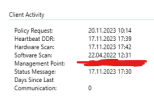
Hello, same problem. the screenshot shows that everything except the software scan is updated normally. But software scan Stuck on the date 04/22/2022 123.png
 
Hello, same problem. the screenshot shows that everything except the software scan is updated normally. But software scan Stuck on the date 04/22/2022 View attachment 5724
Did you review teh logs and confirm that SW Scan completed successfully and send it data to ConfigMgr. SW inv. is notorious bad for hitting the 4 hour timeout and not sending any data to ConfigMgr.
 
Status
Not open for further replies.

Forum statistics

Threads
7,133
Messages
27,858
Members
18,151
Latest member
TonyGTR
Back
Top