
Hi there. Recently I upgraded my SCCM instance from 2409 to 2509. This was not a smooth upgrade for me. I had two main problems. My distribution points got messed up. I rebuilt those and as far as I can tell, they are working properly again. The second problem is with creating new boot images for PXE booting.
Previously, before we did the upgrade, we were having problems trying to update our boot images for use with PXE. SCCM would error out with some 'unable to update the boot image' error whenever I tried to inject new NIC or mass storage drivers. To be clear, this boot image (the one in the picture below with image ID BGS0007C) worked OK, but can't be updated because of the above error. But as time goes on, we'll have more devices that this original boot image won't be able to work with.
One of the reasons I wanted to upgrade from CM2409 to 2509 was for official support for Win11 25H2 deployment. As part of the SCCM upgrade, I installed the December 2024 version of the ADK as well as the WinPE add-on. There were no errors during any of the part of the install/upgrade.
The problem I'm currently having is with my boot images for PXE booting. From what I was reading, after installing the ADK update and upgrading SCCM from 2409 to 2509, I was expecting to see updated boot images in the console, but those never changed.
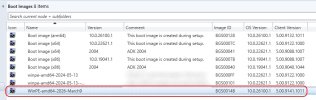
So I've been trying to manually create a new boot image based on the WIM provided from the updated ADK, in C:\Program Files (x86)\Windows Kits\10\Assessment and Deployment Kit\Windows Preinstallation Environment\amd64\en-us\winpe.wim. This created a new boot image with the correct OS version (10.0.26100.1) and Client version (5.00.9141.1011) that I was expecting to see after upgrading SCCM 2409 to 2509:
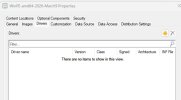
However, when I click on Properties for the new boot image, it's completely empty:
So, to compare, I went to look at one of my old boot images to see what all drivers were on that one (the one with the image ID ending in 07C), but there is no Drivers tab to be found.

Searching here and elsewhere, it sounds like there should be an option to right-click the existing boot images and select "Reload this boot image with the current Windows PE version from the Windows ADK", but I'm not seeing that.

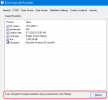
So I'm not sure what's going on. I do see this on the Properties for an existing, older boot image, but I'm not sure if this is the same thing.
Unsure what my options are here, if I simply need to start adding network and mass storage drivers to the new boot image and then get rid of the old ones, once confirming the new one works. But I was hoping to compare the two to see what was all in the original one. As you can tell by this post, I haven't had to play with the boot images process much at all, so just want to ensure I'm doing this properly.... Hope that makes sense! Thanks in advance,
SirTimbit
Previously, before we did the upgrade, we were having problems trying to update our boot images for use with PXE. SCCM would error out with some 'unable to update the boot image' error whenever I tried to inject new NIC or mass storage drivers. To be clear, this boot image (the one in the picture below with image ID BGS0007C) worked OK, but can't be updated because of the above error. But as time goes on, we'll have more devices that this original boot image won't be able to work with.
One of the reasons I wanted to upgrade from CM2409 to 2509 was for official support for Win11 25H2 deployment. As part of the SCCM upgrade, I installed the December 2024 version of the ADK as well as the WinPE add-on. There were no errors during any of the part of the install/upgrade.
The problem I'm currently having is with my boot images for PXE booting. From what I was reading, after installing the ADK update and upgrading SCCM from 2409 to 2509, I was expecting to see updated boot images in the console, but those never changed.
So I've been trying to manually create a new boot image based on the WIM provided from the updated ADK, in C:\Program Files (x86)\Windows Kits\10\Assessment and Deployment Kit\Windows Preinstallation Environment\amd64\en-us\winpe.wim. This created a new boot image with the correct OS version (10.0.26100.1) and Client version (5.00.9141.1011) that I was expecting to see after upgrading SCCM 2409 to 2509:
However, when I click on Properties for the new boot image, it's completely empty:
So, to compare, I went to look at one of my old boot images to see what all drivers were on that one (the one with the image ID ending in 07C), but there is no Drivers tab to be found.
Searching here and elsewhere, it sounds like there should be an option to right-click the existing boot images and select "Reload this boot image with the current Windows PE version from the Windows ADK", but I'm not seeing that.
So I'm not sure what's going on. I do see this on the Properties for an existing, older boot image, but I'm not sure if this is the same thing.
Unsure what my options are here, if I simply need to start adding network and mass storage drivers to the new boot image and then get rid of the old ones, once confirming the new one works. But I was hoping to compare the two to see what was all in the original one. As you can tell by this post, I haven't had to play with the boot images process much at all, so just want to ensure I'm doing this properly.... Hope that makes sense! Thanks in advance,
SirTimbit

