Forums on Intune, SCCM, and Windows 11

Welcome to the forums. Register a free account today to become a member! Once signed in, you'll be able to participate on this site by adding your topics and posts, as well as connect with other members through your own private inbox!

SOLVED WsusPool keeps stopping

Strahinja JANACEK

Active Member
Messages
40
Solutions
5
Reaction score
0
Points
6
Hi all!
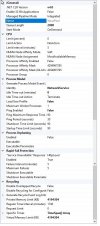
Within IIS the WsusPool keeps stoping, immediately after I start it manually. I was looking for many solutions and configurations, but i's still stopping. Have no idea what to check else. Attached you can find the screenshot of the configuration.
 

Attachments

  • WsusPool_Config.jpg
    WsusPool_Config.jpg
    136.4 KB · Views: 19
Solution
Hi all!
Within IIS the WsusPool keeps stoping, immediately after I start it manually. I was looking for many solutions and configurations, but i's still stopping. Have no idea what to check else. Attached you can find the screenshot of the configuration.

I think I got this issue solved. After my post regarding WSUS I had also the problem, that nothing was pushed to the clients anymore. See this article:

Nothing changed within Software Center when I removed the deployments from SCCM. Seems like during the re-installation of WSUS roles and config, the applicationhost.config or web.config file referenced a module that no...
Hi all!
Within IIS the WsusPool keeps stoping, immediately after I start it manually. I was looking for many solutions and configurations, but i's still stopping. Have no idea what to check else. Attached you can find the screenshot of the configuration.

I think I got this issue solved. After my post regarding WSUS I had also the problem, that nothing was pushed to the clients anymore. See this article:

Nothing changed within Software Center when I removed the deployments from SCCM. Seems like during the re-installation of WSUS roles and config, the applicationhost.config or web.config file referenced a module that no longer existed after the WSUS removal/re-install.

Within the "MpControl.log" (which you can find on the SCCM server, within: ....\Program Files\Microsoft Configuration Manager\tools) I found the following error:
- Call to HttpSendRequestSync failed for port 80 with status code 500, text: Internal Server Error
As described, I made a backup of the "applicationhost.config" and after that I ran the CMD-command which you can also find on this site. The error was gone and the distribution of the apps was working again. And today I installed again the WSUS role and it seems that now it's working. For now the "WsusPool" didn't stopped. Let see if something will change this week, but I hope that it will stay and work as it's doing now.
 
Solution

Forum statistics

Threads
7,165
Messages
27,965
Members
18,265
Latest member
MCorra

Trending content

Back
Top