Forums on Intune, SCCM, and Windows 11

Welcome to the forums. Register a free account today to become a member! Once signed in, you'll be able to participate on this site by adding your topics and posts, as well as connect with other members through your own private inbox!

SOLVED WSUS - SCCM Problem (Office 365 Client)

  • Thread starter Thread starter TomTaylor
  • Start date Start date
  • Replies Replies 3
  • Views Views 2K

TomTaylor

New Member
Messages
2
Reaction score
0
Points
1
Hi all,

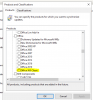
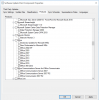
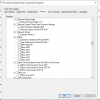
i have a problem with my SCCM. In the WSUS-Console i see the "Office 365 Client". In SCCM-Console i hasn't the "Office 365 Client" to select. Sync works. I have Windows Server 2016 , SQL 2016 with latest patch. CM Version is 1902. I has also removed the WSUS-Service and installed it again. Can everybody help me?

BR Tom
 

Attachments

  • no_o365_client.PNG
    no_o365_client.PNG
    28.6 KB · Views: 6
  • office_o365_client.PNG
    office_o365_client.PNG
    19.6 KB · Views: 6
On my lab, I can see Office 365 Client on the console.1830

Try to force the sync on the SCCM console and check wsyncmgr.log file if there are any errors.
 
I sense the sync issues here. Try uninstalling SUP > Install SUP again > Perform Initial Sync > Later check if O365 client option appears under Office.
 
I uninstall and install the SUP. I have also uninstalled and installed the WSUS. I start the Initial Sync. I checked the logs. The O365 client option don't appears. I attached the log.
 

Attachments

Forum statistics

Threads
7,165
Messages
27,965
Members
18,263
Latest member
markmumford

Trending content

Back
Top