Forums on Intune, SCCM, and Windows 11

Welcome to the forums. Register a free account today to become a member! Once signed in, you'll be able to participate on this site by adding your topics and posts, as well as connect with other members through your own private inbox!

SOLVED WQL Query Windows 10 OS with what version Microsoft Office Installed

  • Thread starter Thread starter tata789
  • Start date Start date
  • Replies Replies 10
  • Views Views 7K
Status
Not open for further replies.

tata789

Well-Known Member
Messages
73
Reaction score
5
Points
8
hello
I need bit help, I need report list for Windows 10 OS and what version of Microsoft Office Installed
If some one know WQL Query to get that kind of report that will be good
I only can run WQL Query, can not run SQL because SQL team did not give me any access to run SQL Query

thank you
AK
 
hello
I have two diriment WQL query one for win 10 and one for Office 2013, and I am not very good in Query, that is why I ask for help

Win 10 WQL Query

select SMS_R_SYSTEM.ResourceID,SMS_R_SYSTEM.ResourceType,SMS_R_SYSTEM.Name,SMS_R_SYSTEM.SMSUniqueIdentifier,SMS_R_SYSTEM.ResourceDomainORWorkgroup,SMS_R_SYSTEM.Client from SMS_R_System where SMS_R_System.OperatingSystemNameandVersion like "%Microsoft Windows NT Workstation 10%"

Office 2013 WQL Query

select distinct SMS_R_System.Name, SMS_G_System_ADD_REMOVE_PROGRAMS.DisplayName, SMS_G_System_ADD_REMOVE_PROGRAMS.Version from SMS_R_System inner join SMS_G_System_ADD_REMOVE_PROGRAMS on SMS_G_System_ADD_REMOVE_PROGRAMS.ResourceID = SMS_R_System.ResourceId where SMS_G_System_ADD_REMOVE_PROGRAMS.DisplayName = "Microsoft Office Professional Plus 2013" order by SMS_R_System.Name

and I like to run as one and list computer name and OS win 10 and office 2013

thank you
 
So you add the add remove program view in just like you did in the second query. that will give you want you want.
 
Sorry I try and i was not able to work, that is why i post , please if you can help that will be good.
I am not good in query, it is my worst part
Thank you
AK
 
Sorry I try and i was not able to work, that is why i post , please if you can help that will be good.
I am not good in query, it is my worst part
Thank you
AK

So how exactly did you create the queries above? Or did you cut and paste these from somewhere else?
 
Last edited:
No, I have the wql query I am using for while and I keep data just you never know when I will need
 
No, I have the wql query I am using for while and I keep data just you never know when I will need
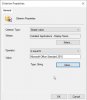
Take the first query and paste it into query.
Then using the wizard edit the query and add Software inventory class with the right SW name.

1948
 
hello
i created as you said and look like this

select SMS_R_System.ResourceId, SMS_R_System.ResourceType, SMS_R_System.Name, SMS_R_System.SMSUniqueIdentifier, SMS_R_System.ResourceDomainORWorkgroup, SMS_R_System.Client from SMS_R_System inner join SMS_G_System_ADD_REMOVE_PROGRAMS on SMS_G_System_ADD_REMOVE_PROGRAMS.ResourceId = SMS_R_System.ResourceId where SMS_R_System.OperatingSystemNameandVersion like "%Microsoft Windows NT Workstation 10%" and SMS_G_System_ADD_REMOVE_PROGRAMS.DisplayName = "Microsoft Office Professional Plus 2013"

only report showed 137 count i thing it should be more
please take a look, if any thing i missed.
if you know better way to do please share
i like to thank you for your help

thank you
AK
 
hello
just i thought should be more higher number than 137,
may be i mad some error but you looked at it and look good , i am fine with that
thank you for your help
can mark as solved
thank you
AK
 
Status
Not open for further replies.

Forum statistics

Threads
7,165
Messages
27,966
Members
18,268
Latest member
rlgura

Trending content

Back
Top