MJ-Tech
Well-Known Member
- Messages
- 217
- Solutions
- 25
- Reaction score
- 21
- Points
- 18
I am working in a small transport company where we have recently built a new server for SCCM 2103.
The below tasks are working fine at the moment and don't see any issues on it,
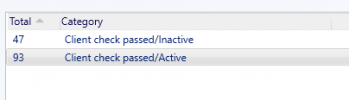
I have deployed windows updates to sccm clients , out of 248 windows 10 client 108 have been updated. My company's expectation is to reach 95% but we are able to meet only 60% for the last couple of months due to unknown-Client check passed/Active & unknown-Client check passed/In-active.
PFA the screenshots.
Could you please suggest this to me ? I am the only person who is working on this activities, it will be great if you could point me in the right direction.
Thanks in Advance.
The below tasks are working fine at the moment and don't see any issues on it,
- Image deployment
- Software Deployment
- OS Upgrade (Task sequence)
I have deployed windows updates to sccm clients , out of 248 windows 10 client 108 have been updated. My company's expectation is to reach 95% but we are able to meet only 60% for the last couple of months due to unknown-Client check passed/Active & unknown-Client check passed/In-active.
PFA the screenshots.
- Disabled automatic update via GPO
- Manually ran the policies in affected machines. (For testing, i have taken 2 machines. restarted, ran the policies, restarted windows update service)
- Followed below steps on 2 affected machines,
1. Stop Windows Update service.
2. Rename C:\Windows\SoftwareDistribution
3. Rename C:\Windows\System32\GroupPolicy\Machine\registry.pol
4. Restart Windows Update service.
2. Rename C:\Windows\SoftwareDistribution
3. Rename C:\Windows\System32\GroupPolicy\Machine\registry.pol
4. Restart Windows Update service.
- used powershell script to force install [Please find the script attached]
Could you please suggest this to me ? I am the only person who is working on this activities, it will be great if you could point me in the right direction.
Thanks in Advance.