Hi all,
I have some computers fully managed by Intune and encrypted by bitlocker.
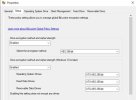
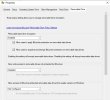
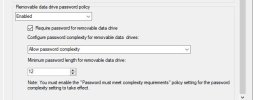
Since I have started my windows 11 deployment I encounter a weird behavior with removable devices and bitlocker. Now, it is mandatory to encrypt usb key/removable device before to use it. It is/was not the case with my windows 10 computers.
Do someone can confirm me that this new behavior is normal woth windows11? Can we disable it ?
I have a temporary workaround that set a value in the registry but Intune policy overwrite it regularly.
As a remember :
Context : intune/bitlocker/windows11/removable devices
Thank you all,
Bye.
I have some computers fully managed by Intune and encrypted by bitlocker.
Since I have started my windows 11 deployment I encounter a weird behavior with removable devices and bitlocker. Now, it is mandatory to encrypt usb key/removable device before to use it. It is/was not the case with my windows 10 computers.
Do someone can confirm me that this new behavior is normal woth windows11? Can we disable it ?
I have a temporary workaround that set a value in the registry but Intune policy overwrite it regularly.
As a remember :
Context : intune/bitlocker/windows11/removable devices
Thank you all,
Bye.