
lalajee2018
Well-Known Member
- Messages
- 143
- Reaction score
- 6
- Points
- 18
Hi,
I have TS to install Windows 10 multi language.
I'm downloading the langauge packs into folder and then i'm using powershell script to install it.
Install Client LP script
Install Fod Script
I can see the language is being download and script is finding the languages but its not install it. I try to manually install it in winpe i get error message but when i try to install it in windows it works fine
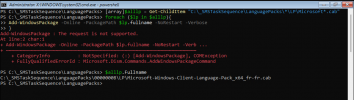
I have TS to install Windows 10 multi language.
I'm downloading the langauge packs into folder and then i'm using powershell script to install it.
Install Client LP script
Code:
Param ($contentPath)

Set-StrictMode -Off

$logFile = "C:\lang\InstallLanguagePacks.log"
if(!(Test-Path $logFile)){New-Item -Path $logFile -Force}

$contentPath | Tee-Object -FilePath $logFile -Append

[array]$AllLPs = Get-ChildItem "$contentPath\*\LP\Microsoft-Windows-Client-Language-Pack_x64*.cab"
"{0:u} | Found {1} language packs:" -f [datetime]::Now, $AllLPs.Count | Tee-Object -FilePath $logFile -Append
$AllLPs.FullName | Tee-Object -FilePath $logFile -Append

Foreach ($lp in $AllLPs)
{
    "Install new LP $lp" | Tee-Object -FilePath $logFile -Append
    $lp.FullName | Tee-Object -FilePath $logFile -Append
    Add-WindowsPackage -Online -PackagePath $lp.FullName -NoRestart -Verbose 3>&1 4>&1 |
    ForEach-Object {"{0:u} | {1}" -f [DateTime]::Now, ($_ | Out-String) | Tee-Object -FilePath $logFile -Append }
}
Install Fod Script
Code:
Param ($contentPath)

Set-StrictMode -Off

$logFile = "C:\Language\InstallLanguagePacks-FOD.log"
if(!(Test-Path $logFile)){New-Item -Path $logFile -Force}

Start-Sleep -Seconds 2
$installedLP = Get-WindowsPackage -Online -PackageName "*Client-languagePack*" |
    Where-Object {$_.PackageState -eq 'Installed' -and $_.PackageName -notmatch '~en-US~' -and $_.PackageName -notmatch '~en-GB~'}

"{0:u} | Detected installed Language packs:" -f [datetime]::Now | Tee-Object -FilePath $logFile -Append
($installedLP | Select-Object CapacityID, PackageName | Out-String -Stream) | Tee-Object -FilePath $logFile -Append

$FODCat = @('Microsoft-Windows-LanguageFeatures-Basic-',
            'Microsoft-Windows-LanguageFeatures-Fonts-',
            'Microsoft-Windows-LanguageFeatures-OCR-',
            'Microsoft-Windows-LanguageFeatures-Handwriting-',
            'Microsoft-Windows-LanguageFeatures-TextToSpeech-',
            'Microsoft-Windows-LanguageFeatures-Speech-',
            'Microsoft-Windows-InternationalFeatures-'
            )
$FODs =@()

foreach($Item in $FODCat)
{
    $FODs += Get-ChildItem "$contentPath\*\FOD\$Item*.cab" | Select-Object -ExpandProperty FullName
}

"{0:} | Reading FOd content source. Found {1} language and readion feature on demand (FOD): " -f [datetime]::Now, $FODs.Count |
    Tee-Object -FilePath $logFile -Append

If($FODs.Count) {
    "",$FODs.Substring($contentPath.Length),"" | Tee-Object -FilePath $logFile -Append
    $FODs | Tee-Object -FilePath $logFile -Append
}

foreach ($fp in $FODs)
{
    "Installing FoD $fp" | Tee-Object -FilePath $logFile -Append
     Add-WindowsPackage -Online -PackagePath "$($fp)" -NoRestart -PreventPending -Verbose 3>&1 4>&1 |
    ForEach-Object {"{0:u} | {1}" -f [DateTime]::Now, ($_ | Out-String) | Tee-Object -FilePath $logFile -Append }
}
I can see the language is being download and script is finding the languages but its not install it. I try to manually install it in winpe i get error message but when i try to install it in windows it works fine

