Forums on Intune, SCCM, and Windows 11

Welcome to the forums. Register a free account today to become a member! Once signed in, you'll be able to participate on this site by adding your topics and posts, as well as connect with other members through your own private inbox!

SOLVED VLC 3.0.21.exe 64 bit SCCM Deployment issue

  • Thread starter Thread starter Eshal
  • Start date Start date
  • Replies Replies 5
  • Views Views 4K
Status
Not open for further replies.

Eshal

New Member
Messages
4
Solutions
1
Reaction score
0
Points
1
Hello,

I am deploying VLC 3.0.21-64bit.exe using SCCM. I have gone with the normal process of using script as there is no MSI version of VLC available.

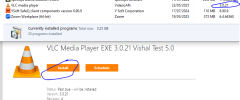
Issue: When deployed to a device collection, it does show in the Software Centre but while installation, it goes in a loop of progress.

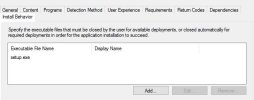
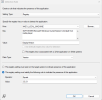
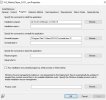
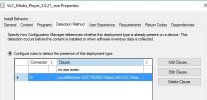
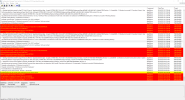
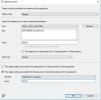
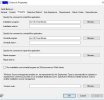
I have attached Screenshots of my detection rules, AppEnforce.log and other settings. I have tried few different methods of detection but not progressed.
Could someone please let me to deploy VLC 3.0.21 64-bit exe application.
AppEnforce.PNGVLC detection-1.JPGVLC detection-2.JPGVLC detection-3.JPGVLC Program script.JPGvlc-install behaviour.JPG

Highly Appreciated,
Eshal
 
Solution
Thank you for your help. The issue is resolved.


Figured out from one of the videos from Mr. Prajwal Desai about deploying vlc exe on YouTube. and noticed that it requires to specify the language code. Also, later it was installed and then had error saying failed to install that was due to 1) having multiple installation (.exe) files in the same directory and 2) was editing the same deployment. Solution was that create a new deployment and new directory and have only one executable file.

Installation Program: vlc-3.0.21-win64.exe /L=1033 /S
Uninstall Program: %Program Files%\VideoLAN\VLC\uninstall.exe /S

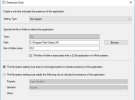
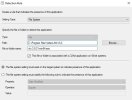
And, I used two different methods for detection. Attached pictures for reference.

thanks
Hello,

I am deploying VLC 3.0.21-64bit.exe using SCCM. I have gone with the normal process of using script as there is no MSI version of VLC available.

Issue: When deployed to a device collection, it does show in the Software Centre but while installation, it goes in a loop of progress.

I have attached Screenshots of my detection rules, AppEnforce.log and other settings. I have tried few different methods of detection but not progressed.
Could someone please let me to deploy VLC 3.0.21 64-bit exe application.

View attachment 7267View attachment 7268View attachment 7269View attachment 7270View attachment 7271View attachment 7272

Highly Appreciated,
Eshal
If I remember correctly the install would be VLCfilename.exe /S and the uninstall would be "C:\Program Files\VideoLAN\VLC\uninstall.exe" /S The /S is the silent switches for install and uninstall.
 
Hello,

I am deploying VLC 3.0.21-64bit.exe using SCCM. I have gone with the normal process of using script as there is no MSI version of VLC available.

Issue: When deployed to a device collection, it does show in the Software Centre but while installation, it goes in a loop of progress.

I have attached Screenshots of my detection rules, AppEnforce.log and other settings. I have tried few different methods of detection but not progressed.
Could someone please let me to deploy VLC 3.0.21 64-bit exe application.

View attachment 7267View attachment 7268View attachment 7269View attachment 7270View attachment 7271View attachment 7272

Highly Appreciated,
Eshal


It has now installed but why do i still see it in software centre. Also while installation it pops up with a failure message but actually the application is then installed.
 

Attachments

  • 3.PNG
    3.PNG
    42.9 KB · Views: 4
Once you get the detection method to work and update the package, they will automatically Disappear in Software Center and will appear as installed, this will happen when the Dtection is good and a retry happens. Had it a few times. Even msi file installations somtimes fail to detect
 
Thank you for your help. The issue is resolved.


Figured out from one of the videos from Mr. Prajwal Desai about deploying vlc exe on YouTube. and noticed that it requires to specify the language code. Also, later it was installed and then had error saying failed to install that was due to 1) having multiple installation (.exe) files in the same directory and 2) was editing the same deployment. Solution was that create a new deployment and new directory and have only one executable file.

Installation Program: vlc-3.0.21-win64.exe /L=1033 /S
Uninstall Program: %Program Files%\VideoLAN\VLC\uninstall.exe /S

And, I used two different methods for detection. Attached pictures for reference.

thanks
 

Attachments

  • Capture.JPG
    Capture.JPG
    55.7 KB · Views: 25
  • detection solution.JPG
    detection solution.JPG
    34.1 KB · Views: 24
Solution
Status
Not open for further replies.

Forum statistics

Threads
7,126
Messages
27,829
Members
18,139
Latest member
KumarGourav

Latest posts

Trending content

Back
Top