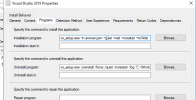
Anyone have luck deploying VS 2019 via SCCM silently with specific workloads already selected? I am trying to push VS 2019 Community edition with a number of workloads pre-selected silently to end users. However when I try this, I get the visual studio launcher on the end user asking to select what to install. Here is what I have tried so far:
installation program
vs_setup.exe –in answer.json –quiet –wait –norestart –noWeb –noUpdateInstaller –nocache (usinga json file with the --add workload commands in them)
I also have tried using the --add workload commands within the command as well above. Both still prompt the installer when pushed.
Any help would be appreciated. I have attached the json file I am trying to use as well as screenshots of what the settings I have currently are. I do not want end users to have the ability to install any workload they want, just want it pushed to them without any interaction. I did try the guide on this site but it is more of a generic deployment and still prompts the installation wizard when pushed.
Thanks.
installation program
vs_setup.exe –in answer.json –quiet –wait –norestart –noWeb –noUpdateInstaller –nocache (usinga json file with the --add workload commands in them)
I also have tried using the --add workload commands within the command as well above. Both still prompt the installer when pushed.
Any help would be appreciated. I have attached the json file I am trying to use as well as screenshots of what the settings I have currently are. I do not want end users to have the ability to install any workload they want, just want it pushed to them without any interaction. I did try the guide on this site but it is more of a generic deployment and still prompts the installation wizard when pushed.
Thanks.