Hi all,
We have an issue with one user who is not able to see linked application in his software center on new staged devices. The user is primary user of these devices.
He has still his original device on which he is able to install software via Software Center. We staged two new devices and on this devices he doesn't see the same software as on his original device.
Other users do not have this problem.Even users which logon to those devices see their linked applications.So, it must be something user related I suppose.
SCCM version 2309 (5.00.9122.1000)
Client OS WIndows 10 22H2 (new device) and 21H2 (original device)
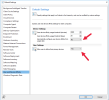
Automatically configure User device affinity is set to No
We are using AD security groups to link a user to a SCCM user collection which is used for deployment.
Any ideas?
Kind Regards,
Bart
We have an issue with one user who is not able to see linked application in his software center on new staged devices. The user is primary user of these devices.
He has still his original device on which he is able to install software via Software Center. We staged two new devices and on this devices he doesn't see the same software as on his original device.
Other users do not have this problem.Even users which logon to those devices see their linked applications.So, it must be something user related I suppose.
SCCM version 2309 (5.00.9122.1000)
Client OS WIndows 10 22H2 (new device) and 21H2 (original device)
Automatically configure User device affinity is set to No
We are using AD security groups to link a user to a SCCM user collection which is used for deployment.
Any ideas?
Kind Regards,
Bart