
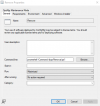
We have been trying to run a powershell script as part of a package and have been unsuccessful getting anything to run. To test, I created a script with just one command - "pause" and verified that it runs on the target machine with the logged in user's rights. Then I created a package program like this:
I set the target machine execution policy to unrestricted and attempted to run it with user rights like this:
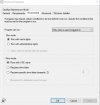
I set the schedule to run it at logon of any user and also checked the box to allow running it from the software center. CM attempts to run the script and the powershell window appears, but seems to crash. We get a very brief flash of red error text and the window closes. The execmgr log shows this:
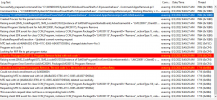
I have tried every variation (running with admin rights, using a drive letter, using -ExecutionPolicy bypass in the command, etc) of this that I can think of with no success. In fact, I have never been able to get a powershell script to run anywhere except during a task sequence.
I have two questions:
1. has anyone here had sucess running powershell in a package or global condition?
2. Is there any way to get the actual error that is happening? CM reports it exits with error 1, but this isn't very helpful.
I set the target machine execution policy to unrestricted and attempted to run it with user rights like this:
I set the schedule to run it at logon of any user and also checked the box to allow running it from the software center. CM attempts to run the script and the powershell window appears, but seems to crash. We get a very brief flash of red error text and the window closes. The execmgr log shows this:
I have tried every variation (running with admin rights, using a drive letter, using -ExecutionPolicy bypass in the command, etc) of this that I can think of with no success. In fact, I have never been able to get a powershell script to run anywhere except during a task sequence.
I have two questions:
1. has anyone here had sucess running powershell in a package or global condition?
2. Is there any way to get the actual error that is happening? CM reports it exits with error 1, but this isn't very helpful.

