Adrian Chlosta
New Member
- Messages
- 2
- Reaction score
- 0
- Points
- 1
Hello Guys,
i have a problem with the SCCM when it comes to the PXE boot.
The PXE boot starts normally up to "Preparing Network Properties" because a reboot happens and the smsts.log is created.
Win2012 R2
SCCM 2012 R2
Same Network Segment
What I've been tried or cleared up so far is:
The Physical Client receives an IP address and can ping SMS providers. (excludes wrong network drivers)
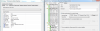
The content has been redistributed [Image]. (was often advised as this would fix the problem)
It happens with all computers and not only with this one. (basic problem which did not occur 2-3 weeks ago)
Rebooted Server.
PXE is active and Required an Password by using PXE.
Respond for incoming PXE request allowed and for all Network Interfaces.
smsts.log is in the appendix
thanks for your effort.
Adrian
i have a problem with the SCCM when it comes to the PXE boot.
The PXE boot starts normally up to "Preparing Network Properties" because a reboot happens and the smsts.log is created.
Win2012 R2
SCCM 2012 R2
Same Network Segment
What I've been tried or cleared up so far is:
The Physical Client receives an IP address and can ping SMS providers. (excludes wrong network drivers)
The content has been redistributed [Image]. (was often advised as this would fix the problem)
It happens with all computers and not only with this one. (basic problem which did not occur 2-3 weeks ago)
Rebooted Server.
PXE is active and Required an Password by using PXE.
Respond for incoming PXE request allowed and for all Network Interfaces.
smsts.log is in the appendix
thanks for your effort.
Adrian