Forums on Intune, SCCM, and Windows 11

Welcome to the forums. Register a free account today to become a member! Once signed in, you'll be able to participate on this site by adding your topics and posts, as well as connect with other members through your own private inbox!

SOLVED Unable to cloud sync Azure group with MECM collection

Status
Not open for further replies.
Messages
8
Reaction score
1
Points
3
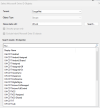
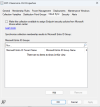
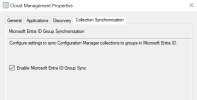
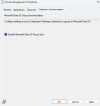
Using the console GUI, right-clicked on my user collection --> Properties --> Cloud Sync --> Add. I searched for the Entra group I want the collection to sync with, found it, selected it, then clicked OK. No error, but no relationship get created
 
I did not understand your issue at all. Please elaborate and add some screenshots for better understanding.
 
Thanks for your reply.

I have security role access in SCCM ("Read-only Analyst", "Asset Manager", "Application Deployment Manager", "Application Administrator", "Operating System Deployment Manager", "Operations Administrator", "Reporting User").
I'm trying to enable cloud sync on a user collection to an Entra group, but it does not work.
Using the console GUI, right-clicked on my user collection --> Properties --> Cloud Sync --> Add. I searched for the Entra group I want the collection to sync with, found it, selected it, then clicked OK. No error, but no cloud sync happens.

1723653393726.png

1723653293366.png
 
What is the goal here?. If i understand your question correctly, you want the device groups created in Entra ID to appear in the ConfigMgr console, is that correct?
 
Understood. Can you see the on-prem users and devices (not groups) synced in the Entra portal?
Yes, I can see. When my SCCM full administrator (he is also global admin who created azure services in Configuration manager console) syncs it works but not for me. I am not full administrator (but I have these access "Read-only Analyst", "Asset Manager", "Application Deployment Manager", "Application Administrator", "Operating System Deployment Manager", "Operations Administrator", "Reporting User"
 
At the beginning of the thread, you did not mention that full administrator role in ConfigMgr can view the collections in the cloud. For the whole time, we were troubleshooting the sync issue. I guess it's a permission related issue. See if this helps: https://learn.microsoft.com/en-us/mem/configmgr/cloud-attach/use-intune-rbac
Thanks, Prajwal for your suggestions. Do I need to be a full administrator in SCCM to do cloud sync through configuration manager console? or do I need any separate permission in SCCM
 
Status
Not open for further replies.

Forum statistics

Threads
7,135
Messages
27,867
Members
18,154
Latest member
maurie
Back
Top