Forums on Intune, SCCM, and Windows 11

Welcome to the forums. Register a free account today to become a member! Once signed in, you'll be able to participate on this site by adding your topics and posts, as well as connect with other members through your own private inbox!

SOLVED The task sequence cannot be run package could not be found on DP

Status
Not open for further replies.

rpoladiya

Active Member
Messages
37
Solutions
1
Reaction score
0
Points
6
Hi,
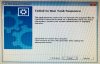
I get the error "The task sequence cannot be run because the program files for < package id > could not be found on DP" when deploying the task sequence through SCCM 1906. The same task sequence was working for 1903 very smoothly without any errors and yesterday updated you 1906 and I get this error. Please Please help me out of this

Thank you
 

Attachments

  • Screen Shot 2019-09-02 at 8.11.27 PM (1024x648).jpg
    Screen Shot 2019-09-02 at 8.11.27 PM (1024x648).jpg
    535.6 KB · Views: 44
find the package and update distribution point. otherwise, re-distribute if its not in the dp
 
The
find the package and update distribution point. otherwise, re-distribute if its not in the dp
the package corresponds to Configuration Manager Client Package. I found the Package. Updated the DP. There is no way you can delete this Package because it is system generated and I redistributed the Package several times.
 
it’s a Boundary group issue and what made me certain its not a BG issue because nothing changed in the SCCM but physically the external network company created separate network in a particular building and the information was not passed on to me. I just checked the ipconfig of the client and saw its connecting to a different network not present im SCCM. It took less than a minute to resolve and I spent hours cracking my head at this Kind regards Romit
 
Status
Not open for further replies.

Forum statistics

Threads
7,169
Messages
27,980
Members
18,282
Latest member
SirTimbit

Trending content

Back
Top