
Hello,
I'm following an Upgrade path for my SCCM Production environment which was in the following configuration:
OS version 2012 R2 => target 2016
SCCM version CB 1810 RU2 => target 2002
SQL Server 2012 SP3 => target SQL Server 2017
At the moment I have already made the following changes (after lab testing):
Upgrade to OS WS2016 (for both Management Point and Database Server)
Upgrade to SSRS 2017
Upgrade to SQL Server 2017 (CU21)
SCCM is working great, the problem is with my reports, it seems they are not accessible, if I try to open one of them i receive the following error (which is present also on the subscriptions):
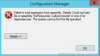
From what I've understood, this is a problem that previously (until SQL Server 2016) could be solved by adding a specific dll ( srsresources.dll ) to the new SSRS installation path and by changing the link to it on the configuration file ( rssrvpolicy.config).
I've tried in lab but nothing has changed exept the error type so i don't want to complicate the situation.
Could you please help if You have encountered this type of error in your experience?
Many Thanks.
Andrea
I'm following an Upgrade path for my SCCM Production environment which was in the following configuration:
OS version 2012 R2 => target 2016
SCCM version CB 1810 RU2 => target 2002
SQL Server 2012 SP3 => target SQL Server 2017
At the moment I have already made the following changes (after lab testing):
Upgrade to OS WS2016 (for both Management Point and Database Server)
Upgrade to SSRS 2017
Upgrade to SQL Server 2017 (CU21)
SCCM is working great, the problem is with my reports, it seems they are not accessible, if I try to open one of them i receive the following error (which is present also on the subscriptions):
From what I've understood, this is a problem that previously (until SQL Server 2016) could be solved by adding a specific dll ( srsresources.dll ) to the new SSRS installation path and by changing the link to it on the configuration file ( rssrvpolicy.config).
I've tried in lab but nothing has changed exept the error type so i don't want to complicate the situation.
Could you please help if You have encountered this type of error in your experience?
Many Thanks.
Andrea
