Forums on Intune, SCCM, and Windows 11

Welcome to the forums. Register a free account today to become a member! Once signed in, you'll be able to participate on this site by adding your topics and posts, as well as connect with other members through your own private inbox!

PENDING Software Center - Install Application & Copy over a file

jbackes

Member
Messages
15
Solutions
1
Reaction score
0
Points
1
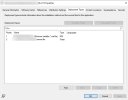
I need to put an application in the Software Center. After the software installs, I need to have a file copy over to the users workstation that the application is installed on. I configured it as follow, see screenshot:

The part that copies the file over is a .bat file doesn't execute. How do I get that .bat to Run As Administrator.

I appreciate any input.
 

Attachments

  • Installer.jpg
    Installer.jpg
    66.8 KB · Views: 21
I need to put an application in the Software Center. After the software installs, I need to have a file copy over to the users workstation that the application is installed on. I configured it as follow, see screenshot:

The part that copies the file over is a .bat file doesn't execute. How do I get that .bat to Run As Administrator.

I appreciate any input.
What exactly does you bat file look like? Are you copying a file from a UNC?
 
I am copying it from the the SCCM UNC path. Example of .bat file shown below:
xcopy "\\sccm\sources\apps\PDF\9\pdf serverfile.dat" "C:\Program Files (x86)\Manufacturer\PDF"
 
Back
Top