Good afternoon,
We are in the process of setting up a secondary distribution point for our servers in an isolated environment which has no access to the internet. The new dp/mp traffic is restricted to Primary site. We've allowed ports TCP 10123, 8530, 8531, 443, 80 to the Primary Site. The clients in the isolated network will have the same rules to the new DP/MP.
I have installed the Management Point and Distribution Point roles to the Site System server. The clients in the isolated environment are receiving application deployments but are not receiving software updates. I have distributed the software update deployment packages to the Distribution point but I am still unable to see the updates in software center. Does the site server also require the Software Updates Role to be able to push updates to the clients?
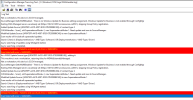
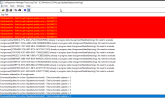
I have included screenshots of the following logs, WUAHandler and the UpdatesDeployment. If these are not enough, please let me know.
Thank you so much in advance.
P.S. This forum is amazing for troubleshooting my issues.
We are in the process of setting up a secondary distribution point for our servers in an isolated environment which has no access to the internet. The new dp/mp traffic is restricted to Primary site. We've allowed ports TCP 10123, 8530, 8531, 443, 80 to the Primary Site. The clients in the isolated network will have the same rules to the new DP/MP.
I have installed the Management Point and Distribution Point roles to the Site System server. The clients in the isolated environment are receiving application deployments but are not receiving software updates. I have distributed the software update deployment packages to the Distribution point but I am still unable to see the updates in software center. Does the site server also require the Software Updates Role to be able to push updates to the clients?
I have included screenshots of the following logs, WUAHandler and the UpdatesDeployment. If these are not enough, please let me know.
Thank you so much in advance.
P.S. This forum is amazing for troubleshooting my issues.