mitsuturbo
Member
- Messages
- 5
- Solutions
- 1
- Reaction score
- 0
- Points
- 1
We've set up a new Secondary site on a Hyper-V VM. It's communicating fine with Primary Site and packages are coming across just fine.
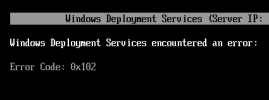
However, It will not allow my test VM client to PXE boot. It hangs on "downloading NBP file", then shuts down after about a minute or two.
The client trying to PXE boot is on the same Hyper-V host and vSwitch as the DP/MP (secondary site).
Checking SMSPXE, i get the following:
CLibSMSMessageWinHttpTransport::Send: WinHttpOpenRequest - URL: MECMSS.x.contoso.com:80 GET /SMS_MP/.sms_aut?MPKEYINFORMATIONEX SCCMPXE 10/19/2023 8:31:57 AM 11088 (0x2B50)
Not in SSL. SCCMPXE 10/19/2023 8:31:57 AM 11088 (0x2B50)
CLibSMSMessageWinHttpTransport::Send: WinHttpOpenRequest - URL: MECMSS.x.contoso.com:80 CCM_POST /ccm_system/request SCCMPXE 10/19/2023 8:31:57 AM 3892 (0x0F34)
Not in SSL. SCCMPXE 10/19/2023 8:31:57 AM 3892 (0x0F34)
CLibSMSMessageWinHttpTransport::Send: WinHttpOpenRequest - URL: MECMSS.x.contoso.com:80 CCM_POST /ccm_system/request SCCMPXE 10/19/2023 8:31:57 AM 11088 (0x2B50)
Not in SSL. SCCMPXE 10/19/2023 8:31:57 AM 11088 (0x2B50)
Client Boot TS reply: <ClientIDReply><Identification Unknown="0" DuplicateSMBIOS="0" DuplicateMACAddress="0" ItemKey="16793208" ServerName=""><Machine><ClientID/><NetbiosName/></Machine></Identification><TSInfo DeploymentID="CLS2003C" PkgID="CLS0003D" BootImageID="CLS00005" Architecture="9" Required="1" AlreadyRun="0" ForPXE="1" Disabled="0" PackageAvailable="1" FutureAvailability="0" Expired="0" UEFIArchitectureMismatch="0" ArchitectureMismatch="0"/><TSInfo DeploymentID="CLS2004B" PkgID="CLS00091" BootImageID="CLS00005" Architecture="9" Required="0" AlreadyRun="0" ForPXE="0" Disabled="0" PackageAvailable="1" FutureAvailability="0" Expired="0" UEFIArchitectureMismatch="0" ArchitectureMismatch="0"/></ClientIDReply>
SCCMPXE 10/19/2023 8:31:57 AM 880 (0x0370)
PXE: 00:15:5D:C3:E1:02: Task Sequence deployment(s) to client machine with item key 16793208: SCCMPXE 10/19/2023 8:31:57 AM 880 (0x0370)
PXE: 00:15:5D:C3:E1:02: CLS2003C, CLS00005, 64-bit, required, is valid. SCCMPXE 10/19/2023 8:31:57 AM 880 (0x0370)
PXE: 00:15:5D:C3:E1:02: CLS2004B, CLS00005, 64-bit, optional, is not deployed for PXE. Discarding from list. SCCMPXE 10/19/2023 8:31:57 AM 880 (0x0370)
PXE: 00:15:5D:C3:E1:02: Using Task Sequence deployment CLS2003C. SCCMPXE 10/19/2023 8:31:57 AM 880 (0x0370)
Packet: Operation: 2 (reply), AdrType: 1, AdrLen: 6, HopCount: 1, TransactID: 910aa565, BootTime: 0, Addr: 00:15:5d:c3:e1:02:00:00:00:00:00:00:00:00:00:00, HostName: , BootFile: smsboot\CLS00005\x64\wdsmgfw.efi, ClientIP: 0.0.0.0, HostIP: 0.0.0.0, ServerIP: 10.57.194.15, RelayIP: 10.57.194.10
Options:
53, 1, MsgType: 05, ack
54, 4, SvrID: 0a 39 c2 0f
97, 17, UUID: 00 5a 70 c8 df a2 2f c3 4d 89 c5 30 6f d8 1f f3 fe
60, 9, ClassID: PXEClient
250, 3, Extension: 0b 01 02 SCCMPXE 10/19/2023 8:31:57 AM 880 (0x0370)
PXE: Sending reply to 10.57.194.10, DHCP. SCCMPXE 10/19/2023 8:31:57 AM 880 (0x0370)
Client Boot TS reply: <ClientIDReply><Identification Unknown="0" DuplicateSMBIOS="0" DuplicateMACAddress="0" ItemKey="16793208" ServerName=""><Machine><ClientID/><NetbiosName/></Machine></Identification><TSInfo DeploymentID="CLS2003C" PkgID="CLS0003D" BootImageID="CLS00005" Architecture="9" Required="1" AlreadyRun="0" ForPXE="1" Disabled="0" PackageAvailable="1" FutureAvailability="0" Expired="0" UEFIArchitectureMismatch="0" ArchitectureMismatch="0"/><TSInfo DeploymentID="CLS2004B" PkgID="CLS00091" BootImageID="CLS00005" Architecture="9" Required="0" AlreadyRun="0" ForPXE="0" Disabled="0" PackageAvailable="1" FutureAvailability="0" Expired="0" UEFIArchitectureMismatch="0" ArchitectureMismatch="0"/></ClientIDReply>
SCCMPXE 10/19/2023 8:31:57 AM 11088 (0x2B50)
PXE: 00:15:5D:C3:E1:02: Task Sequence deployment(s) to client machine with item key 16793208: SCCMPXE 10/19/2023 8:31:57 AM 11088 (0x2B50)
PXE: 00:15:5D:C3:E1:02: CLS2003C, CLS00005, 64-bit, required, is valid. SCCMPXE 10/19/2023 8:31:57 AM 11088 (0x2B50)
PXE: 00:15:5D:C3:E1:02: CLS2004B, CLS00005, 64-bit, optional, is not deployed for PXE. Discarding from list. SCCMPXE 10/19/2023 8:31:57 AM 11088 (0x2B50)
PXE: 00:15:5D:C3:E1:02: Using Task Sequence deployment CLS2003C. SCCMPXE 10/19/2023 8:31:57 AM 11088 (0x2B50)
Packet: Operation: 2 (reply), AdrType: 1, AdrLen: 6, HopCount: 1, TransactID: 910aa565, BootTime: 0, Addr: 00:15:5d:c3:e1:02:00:00:00:00:00:00:00:00:00:00, HostName: , BootFile: smsboot\CLS00005\x64\wdsmgfw.efi, ClientIP: 0.0.0.0, HostIP: 0.0.0.0, ServerIP: 10.57.194.15, RelayIP: 10.57.194.9
Options:
53, 1, MsgType: 05, ack
54, 4, SvrID: 0a 39 c2 0f
97, 17, UUID: 00 5a 70 c8 df a2 2f c3 4d 89 c5 30 6f d8 1f f3 fe
60, 9, ClassID: PXEClient
250, 3, Extension: 0b 01 02 SCCMPXE 10/19/2023 8:31:57 AM 11088 (0x2B50)
PXE: Sending reply to 10.57.194.9, DHCP. SCCMPXE 10/19/2023 8:31:57 AM 11088 (0x2B50)
Client Boot TS reply: <ClientIDReply><Identification Unknown="0" DuplicateSMBIOS="0" DuplicateMACAddress="0" ItemKey="16793208" ServerName=""><Machine><ClientID/><NetbiosName/></Machine></Identification><TSInfo DeploymentID="CLS2003C" PkgID="CLS0003D" BootImageID="CLS00005" Architecture="9" Required="1" AlreadyRun="0" ForPXE="1" Disabled="0" PackageAvailable="1" FutureAvailability="0" Expired="0" UEFIArchitectureMismatch="0" ArchitectureMismatch="0"/><TSInfo DeploymentID="CLS2004B" PkgID="CLS00091" BootImageID="CLS00005" Architecture="9" Required="0" AlreadyRun="0" ForPXE="0" Disabled="0" PackageAvailable="1" FutureAvailability="0" Expired="0" UEFIArchitectureMismatch="0" ArchitectureMismatch="0"/></ClientIDReply>
SCCMPXE 10/19/2023 8:31:57 AM 3892 (0x0F34)
PXE: 00:15:5D:C3:E1:02: Task Sequence deployment(s) to client machine with item key 16793208: SCCMPXE 10/19/2023 8:31:57 AM 3892 (0x0F34)
PXE: 00:15:5D:C3:E1:02: CLS2003C, CLS00005, 64-bit, required, is valid. SCCMPXE 10/19/2023 8:31:57 AM 3892 (0x0F34)
PXE: 00:15:5D:C3:E1:02: CLS2004B, CLS00005, 64-bit, optional, is not deployed for PXE. Discarding from list. SCCMPXE 10/19/2023 8:31:57 AM 3892 (0x0F34)
PXE: 00:15:5D:C3:E1:02: Using Task Sequence deployment CLS2003C. SCCMPXE 10/19/2023 8:31:57 AM 3892 (0x0F34)
Packet: Operation: 2 (reply), AdrType: 1, AdrLen: 6, HopCount: 0, TransactID: f97dd773, BootTime: 0, Addr: 00:15:5d:c3:e1:02:00:00:00:00:00:00:00:00:00:00, HostName: , BootFile: smsboot\CLS00005\x64\wdsmgfw.efi, ClientIP: 10.57.194.101, HostIP: 0.0.0.0, ServerIP: 10.57.194.15, RelayIP: 0.0.0.0
Options:
53, 1, MsgType: 05, ack
54, 4, SvrID: 0a 39 c2 0f
97, 17, UUID: 00 5a 70 c8 df a2 2f c3 4d 89 c5 30 6f d8 1f f3 fe
60, 9, ClassID: PXEClient
250, 3, Extension: 0b 01 02 SCCMPXE 10/19/2023 8:31:57 AM 3892 (0x0F34)
PXE: Sending reply to 10.57.194.101, PXE. SCCMPXE 10/19/2023 8:31:57 AM 3892 (0x0F34)
TFTP: 10.57.194.101: connected. SCCMPXE 10/19/2023 8:31:58 AM 3600 (0x0E10)
TFTP: 10.57.194.101: request for smsboot\CLS00005\x64\wdsmgfw.efi. SCCMPXE 10/19/2023 8:31:58 AM 3600 (0x0E10)
TFTP: 10.57.194.101: sending smsboot\CLS00005\x64\wdsmgfw.efi, 4, 1482, 0. SCCMPXE 10/19/2023 8:31:58 AM 3600 (0x0E10)
TFTP: TCount=1. SCCMPXE 10/19/2023 8:31:58 AM 11036 (0x2B1C)
TFTP: FCount=0. SCCMPXE 10/19/2023 8:31:58 AM 11036 (0x2B1C)
TFTP: 10.57.194.101: connected. SCCMPXE 10/19/2023 8:31:58 AM 3600 (0x0E10)
TFTP: 10.57.194.101: request for smsboot\CLS00005\x64\wdsmgfw.efi. SCCMPXE 10/19/2023 8:31:58 AM 3600 (0x0E10)
TFTP: 10.57.194.101: sending smsboot\CLS00005\x64\wdsmgfw.efi, 4, 1482, -1. SCCMPXE 10/19/2023 8:31:58 AM 3600 (0x0E10)
TFTP: TCount=1. SCCMPXE 10/19/2023 8:31:58 AM 920 (0x0398)
TFTP: 10.57.194.101: recvfrom() returned 0x8007274c. Waiting for 4. SCCMPXE 10/19/2023 8:32:23 AM 920 (0x0398)
TFTP: 10.57.194.101: recvfrom() returned 0x8007274c. Waiting for 4. SCCMPXE 10/19/2023 8:32:28 AM 920 (0x0398)
TFTP: 10.57.194.101: recvfrom() returned 0x8007274c. Waiting for 4. SCCMPXE 10/19/2023 8:32:33 AM 920 (0x0398)
TFTP: 10.57.194.101: timed-out. SCCMPXE 10/19/2023 8:32:43 AM 920 (0x0398)
TFTP: FCount=0. SCCMPXE 10/19/2023 8:32:43 AM 920 (0x0398)
Any help or advice would be greatly appreciated.
However, It will not allow my test VM client to PXE boot. It hangs on "downloading NBP file", then shuts down after about a minute or two.
The client trying to PXE boot is on the same Hyper-V host and vSwitch as the DP/MP (secondary site).
Checking SMSPXE, i get the following:
CLibSMSMessageWinHttpTransport::Send: WinHttpOpenRequest - URL: MECMSS.x.contoso.com:80 GET /SMS_MP/.sms_aut?MPKEYINFORMATIONEX SCCMPXE 10/19/2023 8:31:57 AM 11088 (0x2B50)
Not in SSL. SCCMPXE 10/19/2023 8:31:57 AM 11088 (0x2B50)
CLibSMSMessageWinHttpTransport::Send: WinHttpOpenRequest - URL: MECMSS.x.contoso.com:80 CCM_POST /ccm_system/request SCCMPXE 10/19/2023 8:31:57 AM 3892 (0x0F34)
Not in SSL. SCCMPXE 10/19/2023 8:31:57 AM 3892 (0x0F34)
CLibSMSMessageWinHttpTransport::Send: WinHttpOpenRequest - URL: MECMSS.x.contoso.com:80 CCM_POST /ccm_system/request SCCMPXE 10/19/2023 8:31:57 AM 11088 (0x2B50)
Not in SSL. SCCMPXE 10/19/2023 8:31:57 AM 11088 (0x2B50)
Client Boot TS reply: <ClientIDReply><Identification Unknown="0" DuplicateSMBIOS="0" DuplicateMACAddress="0" ItemKey="16793208" ServerName=""><Machine><ClientID/><NetbiosName/></Machine></Identification><TSInfo DeploymentID="CLS2003C" PkgID="CLS0003D" BootImageID="CLS00005" Architecture="9" Required="1" AlreadyRun="0" ForPXE="1" Disabled="0" PackageAvailable="1" FutureAvailability="0" Expired="0" UEFIArchitectureMismatch="0" ArchitectureMismatch="0"/><TSInfo DeploymentID="CLS2004B" PkgID="CLS00091" BootImageID="CLS00005" Architecture="9" Required="0" AlreadyRun="0" ForPXE="0" Disabled="0" PackageAvailable="1" FutureAvailability="0" Expired="0" UEFIArchitectureMismatch="0" ArchitectureMismatch="0"/></ClientIDReply>
SCCMPXE 10/19/2023 8:31:57 AM 880 (0x0370)
PXE: 00:15:5D:C3:E1:02: Task Sequence deployment(s) to client machine with item key 16793208: SCCMPXE 10/19/2023 8:31:57 AM 880 (0x0370)
PXE: 00:15:5D:C3:E1:02: CLS2003C, CLS00005, 64-bit, required, is valid. SCCMPXE 10/19/2023 8:31:57 AM 880 (0x0370)
PXE: 00:15:5D:C3:E1:02: CLS2004B, CLS00005, 64-bit, optional, is not deployed for PXE. Discarding from list. SCCMPXE 10/19/2023 8:31:57 AM 880 (0x0370)
PXE: 00:15:5D:C3:E1:02: Using Task Sequence deployment CLS2003C. SCCMPXE 10/19/2023 8:31:57 AM 880 (0x0370)
Packet: Operation: 2 (reply), AdrType: 1, AdrLen: 6, HopCount: 1, TransactID: 910aa565, BootTime: 0, Addr: 00:15:5d:c3:e1:02:00:00:00:00:00:00:00:00:00:00, HostName: , BootFile: smsboot\CLS00005\x64\wdsmgfw.efi, ClientIP: 0.0.0.0, HostIP: 0.0.0.0, ServerIP: 10.57.194.15, RelayIP: 10.57.194.10
Options:
53, 1, MsgType: 05, ack
54, 4, SvrID: 0a 39 c2 0f
97, 17, UUID: 00 5a 70 c8 df a2 2f c3 4d 89 c5 30 6f d8 1f f3 fe
60, 9, ClassID: PXEClient
250, 3, Extension: 0b 01 02 SCCMPXE 10/19/2023 8:31:57 AM 880 (0x0370)
PXE: Sending reply to 10.57.194.10, DHCP. SCCMPXE 10/19/2023 8:31:57 AM 880 (0x0370)
Client Boot TS reply: <ClientIDReply><Identification Unknown="0" DuplicateSMBIOS="0" DuplicateMACAddress="0" ItemKey="16793208" ServerName=""><Machine><ClientID/><NetbiosName/></Machine></Identification><TSInfo DeploymentID="CLS2003C" PkgID="CLS0003D" BootImageID="CLS00005" Architecture="9" Required="1" AlreadyRun="0" ForPXE="1" Disabled="0" PackageAvailable="1" FutureAvailability="0" Expired="0" UEFIArchitectureMismatch="0" ArchitectureMismatch="0"/><TSInfo DeploymentID="CLS2004B" PkgID="CLS00091" BootImageID="CLS00005" Architecture="9" Required="0" AlreadyRun="0" ForPXE="0" Disabled="0" PackageAvailable="1" FutureAvailability="0" Expired="0" UEFIArchitectureMismatch="0" ArchitectureMismatch="0"/></ClientIDReply>
SCCMPXE 10/19/2023 8:31:57 AM 11088 (0x2B50)
PXE: 00:15:5D:C3:E1:02: Task Sequence deployment(s) to client machine with item key 16793208: SCCMPXE 10/19/2023 8:31:57 AM 11088 (0x2B50)
PXE: 00:15:5D:C3:E1:02: CLS2003C, CLS00005, 64-bit, required, is valid. SCCMPXE 10/19/2023 8:31:57 AM 11088 (0x2B50)
PXE: 00:15:5D:C3:E1:02: CLS2004B, CLS00005, 64-bit, optional, is not deployed for PXE. Discarding from list. SCCMPXE 10/19/2023 8:31:57 AM 11088 (0x2B50)
PXE: 00:15:5D:C3:E1:02: Using Task Sequence deployment CLS2003C. SCCMPXE 10/19/2023 8:31:57 AM 11088 (0x2B50)
Packet: Operation: 2 (reply), AdrType: 1, AdrLen: 6, HopCount: 1, TransactID: 910aa565, BootTime: 0, Addr: 00:15:5d:c3:e1:02:00:00:00:00:00:00:00:00:00:00, HostName: , BootFile: smsboot\CLS00005\x64\wdsmgfw.efi, ClientIP: 0.0.0.0, HostIP: 0.0.0.0, ServerIP: 10.57.194.15, RelayIP: 10.57.194.9
Options:
53, 1, MsgType: 05, ack
54, 4, SvrID: 0a 39 c2 0f
97, 17, UUID: 00 5a 70 c8 df a2 2f c3 4d 89 c5 30 6f d8 1f f3 fe
60, 9, ClassID: PXEClient
250, 3, Extension: 0b 01 02 SCCMPXE 10/19/2023 8:31:57 AM 11088 (0x2B50)
PXE: Sending reply to 10.57.194.9, DHCP. SCCMPXE 10/19/2023 8:31:57 AM 11088 (0x2B50)
Client Boot TS reply: <ClientIDReply><Identification Unknown="0" DuplicateSMBIOS="0" DuplicateMACAddress="0" ItemKey="16793208" ServerName=""><Machine><ClientID/><NetbiosName/></Machine></Identification><TSInfo DeploymentID="CLS2003C" PkgID="CLS0003D" BootImageID="CLS00005" Architecture="9" Required="1" AlreadyRun="0" ForPXE="1" Disabled="0" PackageAvailable="1" FutureAvailability="0" Expired="0" UEFIArchitectureMismatch="0" ArchitectureMismatch="0"/><TSInfo DeploymentID="CLS2004B" PkgID="CLS00091" BootImageID="CLS00005" Architecture="9" Required="0" AlreadyRun="0" ForPXE="0" Disabled="0" PackageAvailable="1" FutureAvailability="0" Expired="0" UEFIArchitectureMismatch="0" ArchitectureMismatch="0"/></ClientIDReply>
SCCMPXE 10/19/2023 8:31:57 AM 3892 (0x0F34)
PXE: 00:15:5D:C3:E1:02: Task Sequence deployment(s) to client machine with item key 16793208: SCCMPXE 10/19/2023 8:31:57 AM 3892 (0x0F34)
PXE: 00:15:5D:C3:E1:02: CLS2003C, CLS00005, 64-bit, required, is valid. SCCMPXE 10/19/2023 8:31:57 AM 3892 (0x0F34)
PXE: 00:15:5D:C3:E1:02: CLS2004B, CLS00005, 64-bit, optional, is not deployed for PXE. Discarding from list. SCCMPXE 10/19/2023 8:31:57 AM 3892 (0x0F34)
PXE: 00:15:5D:C3:E1:02: Using Task Sequence deployment CLS2003C. SCCMPXE 10/19/2023 8:31:57 AM 3892 (0x0F34)
Packet: Operation: 2 (reply), AdrType: 1, AdrLen: 6, HopCount: 0, TransactID: f97dd773, BootTime: 0, Addr: 00:15:5d:c3:e1:02:00:00:00:00:00:00:00:00:00:00, HostName: , BootFile: smsboot\CLS00005\x64\wdsmgfw.efi, ClientIP: 10.57.194.101, HostIP: 0.0.0.0, ServerIP: 10.57.194.15, RelayIP: 0.0.0.0
Options:
53, 1, MsgType: 05, ack
54, 4, SvrID: 0a 39 c2 0f
97, 17, UUID: 00 5a 70 c8 df a2 2f c3 4d 89 c5 30 6f d8 1f f3 fe
60, 9, ClassID: PXEClient
250, 3, Extension: 0b 01 02 SCCMPXE 10/19/2023 8:31:57 AM 3892 (0x0F34)
PXE: Sending reply to 10.57.194.101, PXE. SCCMPXE 10/19/2023 8:31:57 AM 3892 (0x0F34)
TFTP: 10.57.194.101: connected. SCCMPXE 10/19/2023 8:31:58 AM 3600 (0x0E10)
TFTP: 10.57.194.101: request for smsboot\CLS00005\x64\wdsmgfw.efi. SCCMPXE 10/19/2023 8:31:58 AM 3600 (0x0E10)
TFTP: 10.57.194.101: sending smsboot\CLS00005\x64\wdsmgfw.efi, 4, 1482, 0. SCCMPXE 10/19/2023 8:31:58 AM 3600 (0x0E10)
TFTP: TCount=1. SCCMPXE 10/19/2023 8:31:58 AM 11036 (0x2B1C)
TFTP: FCount=0. SCCMPXE 10/19/2023 8:31:58 AM 11036 (0x2B1C)
TFTP: 10.57.194.101: connected. SCCMPXE 10/19/2023 8:31:58 AM 3600 (0x0E10)
TFTP: 10.57.194.101: request for smsboot\CLS00005\x64\wdsmgfw.efi. SCCMPXE 10/19/2023 8:31:58 AM 3600 (0x0E10)
TFTP: 10.57.194.101: sending smsboot\CLS00005\x64\wdsmgfw.efi, 4, 1482, -1. SCCMPXE 10/19/2023 8:31:58 AM 3600 (0x0E10)
TFTP: TCount=1. SCCMPXE 10/19/2023 8:31:58 AM 920 (0x0398)
TFTP: 10.57.194.101: recvfrom() returned 0x8007274c. Waiting for 4. SCCMPXE 10/19/2023 8:32:23 AM 920 (0x0398)
TFTP: 10.57.194.101: recvfrom() returned 0x8007274c. Waiting for 4. SCCMPXE 10/19/2023 8:32:28 AM 920 (0x0398)
TFTP: 10.57.194.101: recvfrom() returned 0x8007274c. Waiting for 4. SCCMPXE 10/19/2023 8:32:33 AM 920 (0x0398)
TFTP: 10.57.194.101: timed-out. SCCMPXE 10/19/2023 8:32:43 AM 920 (0x0398)
TFTP: FCount=0. SCCMPXE 10/19/2023 8:32:43 AM 920 (0x0398)
Any help or advice would be greatly appreciated.