Forums on Intune, SCCM, and Windows 11

Welcome to the forums. Register a free account today to become a member! Once signed in, you'll be able to participate on this site by adding your topics and posts, as well as connect with other members through your own private inbox!

SOLVED SCCM Updates: No September CU for product "Windows 10 1903 and later" only "Windows 10 GDR"

Status
Not open for further replies.

Vital Lee

Member
Messages
15
Solutions
2
Reaction score
4
Points
3
Hello, for September's patch Tuesday MS released Windows 10 CU KB5017308 only for product "Windows 10 - GDR DU", but not for "Windows 10 1903 and later". All our Windows 10 20H2, 21H1, 21H2 are detected by SCCM as "Windows 10 1903 and later" - so that no update for these systems. But if we initiate "Check online for updates from Microsoft Update" - it's getting installed. So Microsoft Update treats the system product as "Windows 10 - GDR DU", but SCCM as "Windows 10 1903 and later". Can anyone explain this situation?
 
Solution
It looks like I have figured out what happened.
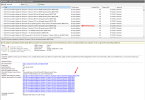
Make long story short, 5017308 (release date 09/13) that has classification Security Update is superseded by 5017380 (release date 09/21) which is Preview (for some reason) and has Update classification.
By default WSUS approval rule approves only critical and security updates, but not just 'Update' classification. So that this update has been Declined.
So there are some questions to MS:
- How a preview can be released AFTER the release of a regular update?
- Why update that supersedes has different Classification?
We decided to wait for October CU to update our workstations.
Screenshot_139.png
I had the same issue. one of the technical sites mentioned to follow the steps below,

  • Deselect all the software update classifications from the Classifications tab.
  • Click Sync
  • Once the sync is completed, add back the software update classifications
I received new updates but not the below ones ,

KB5017308
KB5017858
KB5017380
 
I had the same issue. one of the technical sites mentioned to follow the steps below,

  • Deselect all the software update classifications from the Classifications tab.
  • Click Sync
  • Once the sync is completed, add back the software update classifications
I received new updates but not the below ones ,

KB5017308
KB5017858
KB5017380
I am having the same issue.
I read on this link that those updates are expired now some how
 
I had the same issue. one of the technical sites mentioned to follow the steps below,

  • Deselect all the software update classifications from the Classifications tab.
  • Click Sync
  • Once the sync is completed, add back the software update classifications
I received new updates but not the below ones ,

KB5017308
KB5017858
KB5017380
Hello Muneer,
Unfortunately this procedure didn't help me.
Sync log with no classification selected:
Code:
Sync succeeded. Setting sync alert to canceled state on site XXX    SMS_WSUS_SYNC_MANAGER    10/6/2022 3:59:08 PM    7368 (0x1CC8)
No changes made to the SMS database, content version remains 160    SMS_WSUS_SYNC_MANAGER    10/6/2022 3:59:08 PM    7368 (0x1CC8)
Sync time: 0d00h02m14s    SMS_WSUS_SYNC_MANAGER    10/6/2022 3:59:08 PM    7368 (0x1CC8)
Skipping Delete Expired Update relations since this is not a scheduled sync.    SMS_WSUS_SYNC_MANAGER    10/6/2022 3:59:08 PM    7368 (0x1CC8)

The log after I checked some classifications:
Code:
Sync succeeded. Setting sync alert to canceled state on site XXX SMS_WSUS_SYNC_MANAGER 10/6/2022 4:24:43 PM 7368 (0x1CC8)
Updated 161 items in SMS database, new update source content version is 161 SMS_WSUS_SYNC_MANAGER 10/6/2022 4:24:43 PM 7368 (0x1CC8)
Sync time: 0d00h09m34s SMS_WSUS_SYNC_MANAGER 10/6/2022 4:24:43 PM 7368 (0x1CC8)
Skipping Delete Expired Update relations since this is not a scheduled sync. SMS_WSUS_SYNC_MANAGER 10/6/2022 4:24:43 PM 7368 (0x1CC8)
Inbox source is local on EVRUPETSA0086.rntgroup.com SMS_WSUS_SYNC_MANAGER 10/6/2022 4:24:43 PM 7368 (0x1CC8)
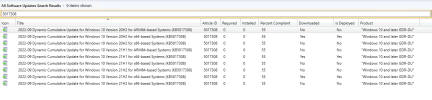
No updates appeared for Windows 10 1903 and later product.
Screenshot_138.png
 
Hello Muneer,
Unfortunately this procedure didn't help me.
Sync log with no classification selected:
Code:
Sync succeeded. Setting sync alert to canceled state on site XXX    SMS_WSUS_SYNC_MANAGER    10/6/2022 3:59:08 PM    7368 (0x1CC8)
No changes made to the SMS database, content version remains 160    SMS_WSUS_SYNC_MANAGER    10/6/2022 3:59:08 PM    7368 (0x1CC8)
Sync time: 0d00h02m14s    SMS_WSUS_SYNC_MANAGER    10/6/2022 3:59:08 PM    7368 (0x1CC8)
Skipping Delete Expired Update relations since this is not a scheduled sync.    SMS_WSUS_SYNC_MANAGER    10/6/2022 3:59:08 PM    7368 (0x1CC8)

The log after I checked some classifications:
Code:
Sync succeeded. Setting sync alert to canceled state on site XXX SMS_WSUS_SYNC_MANAGER 10/6/2022 4:24:43 PM 7368 (0x1CC8)
Updated 161 items in SMS database, new update source content version is 161 SMS_WSUS_SYNC_MANAGER 10/6/2022 4:24:43 PM 7368 (0x1CC8)
Sync time: 0d00h09m34s SMS_WSUS_SYNC_MANAGER 10/6/2022 4:24:43 PM 7368 (0x1CC8)
Skipping Delete Expired Update relations since this is not a scheduled sync. SMS_WSUS_SYNC_MANAGER 10/6/2022 4:24:43 PM 7368 (0x1CC8)
Inbox source is local on EVRUPETSA0086.rntgroup.com SMS_WSUS_SYNC_MANAGER 10/6/2022 4:24:43 PM 7368 (0x1CC8)
No updates appeared for Windows 10 1903 and later product.
View attachment 4798
Yes, as mentioned by prakash051 below 3 KB's are expired,
KB5017308
KB5017858
KB5017380

 
It looks like I have figured out what happened.
Make long story short, 5017308 (release date 09/13) that has classification Security Update is superseded by 5017380 (release date 09/21) which is Preview (for some reason) and has Update classification.
By default WSUS approval rule approves only critical and security updates, but not just 'Update' classification. So that this update has been Declined.
So there are some questions to MS:
- How a preview can be released AFTER the release of a regular update?
- Why update that supersedes has different Classification?
We decided to wait for October CU to update our workstations.
Screenshot_139.png
 
Solution
Status
Not open for further replies.

Forum statistics

Threads
7,151
Messages
27,921
Members
18,223
Latest member
hvrieswijk

Trending content

Back
Top