Forums on Intune, SCCM, and Windows 11

Welcome to the forums. Register a free account today to become a member! Once signed in, you'll be able to participate on this site by adding your topics and posts, as well as connect with other members through your own private inbox!

SOLVED SCCM update stuck in downloading state

  • Thread starter Thread starter jpatj
  • Start date Start date
  • Replies Replies 5
  • Views Views 9K
Status
Not open for further replies.

jpatj

New Member
Messages
4
Reaction score
0
Points
1
We have 2 SCCM environments. I already successfully updated 1 to version 2107. The second one has also been updated to 2107 but in the meanwhile 2111 came available. I can see I can install it in the 1st environment but in the 2nd it is stuck in the 'Downloading' state.
I saw multiple forum posts to check the 'dmpdownloader.log'. It is even referenced to in the SCCM console.
However, there is no such log file on the whole system. I also checked hidden files to make sure I didn't miss it.

To make things even more puzzling, there is also no EasySetupPayload folder. I do see that logfile and that folder in my other environment on the SCCM server.
I did manage to upgrade to version 2107 (from 18xx something) so apparently this folder wasn't used at all?
Looks like there were some files and folders downloaded to the CMUStaging folder instead.
So I have no idea what's going on here.
 
Thank you Prajwal! I looked everywhere for the dmpdownloader.log but it's not present. In my other environment I see it in the default Log folder. I wonder what was done to this SCCM server in the past to have this strange kind of issue (I haven't set it up intially).
The cmupdatereset tool didn't work. I asked the DBA's to grant me the appropriate rights so I can run it again. I think I don't have enough rights now to run it.
I am puzzled that I managed to update it from (I think 1806) to 2107 without the presence of the Easysetuppayload folder and the dmpdownloader log file.

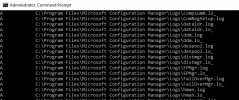
I went to the C:\Program Files\Microsoft Configuration Manager\Logs folder and run the attrib command (to make sure I don't miss any hidden or system files). See the partial output in the attachment. Under the letter D there is no dmpdownloader.log file.
 

Attachments

  • attrib.png
    attrib.png
    35.8 KB · Views: 7
Ok, I just found out that someone redirected some folders to another server (which runs WSUS)!
I have no idea why, is this a best practice?
So the following folders have been redirected to the C share of this other server:
AdminUIContentPayload, bin, Cloudservices, data, EasySetupPayload, ISVTemp, Logs, MP, officemanifest, OMSUpgradeAnalyticsPayload, scripts and SMS_OCM_DATACACHE.

Very strange. Can this be changed after? Or shouldn't it be a problem? Also now I know where to find the dmpdownloader.log file.
 
We had some external consultants in the past, I'm afraid I can't find out how this happened anymore and who did this with what reason. Anyway, glad I did find out. Will have to see what to do next.
 
Status
Not open for further replies.

Forum statistics

Threads
7,165
Messages
27,965
Members
18,265
Latest member
MCorra

Trending content

Back
Top