Forums on Intune, SCCM, and Windows 11

Welcome to the forums. Register a free account today to become a member! Once signed in, you'll be able to participate on this site by adding your topics and posts, as well as connect with other members through your own private inbox!

SOLVED SCCM - SMSPKG Folder cleanup

  • Thread starter Thread starter V3TR4x
  • Start date Start date
  • Replies Replies 5
  • Views Views 10K

V3TR4x

Member
Messages
7
Reaction score
0
Points
1
Hi,
My Space on the SCCM is almost full, so I searched for a way to clean it up

I found the contentlibraryCleanup.exe but I don't think that's the right one.

I have a D Partition that has 3 TB, where I found the SMSPKG Folder.
What uses has this SMSPKG folder and can you delete the .temp files or the PKG files ?

thanks for your answer
with kind regards
V3TR4x
 
Hi,
My Space on the SCCM is almost full, so I searched for a way to clean it up

I found the contentlibraryCleanup.exe but I don't think that's the right one.

I have a D Partition that has 3 TB, where I found the SMSPKG Folder.
What uses has this SMSPKG folder and can you delete the .temp files or the PKG files ?

thanks for your answer
with kind regards
V3TR4x
Go into WSUS and run the Server Cleanup Wizard. It might seem frozen at some point after initiating the cleanup, but just let it finish. My drive is less than 1 TB and can take hours to run sometimes.
 
Exactly what is consuming all the space? Why do you think that content wizard will help?
 
Go into WSUS and run the Server Cleanup Wizard. It might seem frozen at some point after initiating the cleanup, but just let it finish. My drive is less than 1 TB and can take hours to run sometimes.
Hi MDKnightR,
I already did that, but he only cleaned a few updates and that was it. So I don't think I got more then 10 GB from the cleanup

Hi Garth,
I think I wrote it in the false way
I searched for a tool to make a cleanup and the first thing I found was the content wizard to remove files that are no longer in use. But it is only on DPs and not the primary site.

About the Space:
I have 1 Primary Site and 9 secondary sites + about 20 Distribution Points in other locations
On the Primary Site is the WSUS installed, but DP and MP are on a separate Server. 1642660923800.png
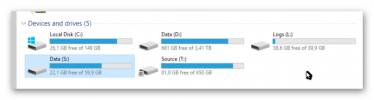
I don't think Data (D:) needs so much space. I enabled Data Deduplication so its shows that 2.8 TB are used, without the Data Deduplication the whole D Drive would be 9 TB. So I searched if there are files on the PS that are not in use or he couldn't delete. I found the PCK Files that are created in 2020. But before I delete any files I always checking on forums about it but I couldn't really get the informations what use the SMSPKG folder has.
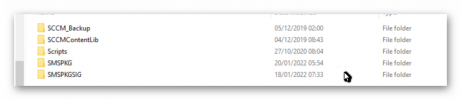
1642661013873.png
As I could read, the folder should have something do to with the sync/replication between the Servers. But I am not sure, so can you bring some light in the dark ?
My questions would be :
What is the Use of SMSPKG ?
Can I delete the files on there ?
If yes, will there be any steps to make after removing ?

with kind regards and thanks again for your anwers
V3tr4x
 
Deleting anything out of the inboxes is generally a bad idea. Particularly without reviewing the log files.

smspkg folder stores package sources that are sent to other sites/dps. If you delete them they will get recreated if they are needed again. Which will slow down the deployment time.
 
Deleting anything out of the inboxes is generally a bad idea. Particularly without reviewing the log files.

smspkg folder stores package sources that are sent to other sites/dps. If you delete them they will get recreated if they are needed again. Which will slow down the deployment time.
mhm, okay thanks
Then I will not delete anything
I will have to reorganise the Windows Updates
thanks for your time and reply
 

Forum statistics

Threads
7,165
Messages
27,965
Members
18,267
Latest member
immutableID

Trending content

Back
Top