Forums on Intune, SCCM, and Windows 11

Welcome to the forums. Register a free account today to become a member! Once signed in, you'll be able to participate on this site by adding your topics and posts, as well as connect with other members through your own private inbox!

PENDING SCCM Site Status - Management Point Critical

  • Thread starter Thread starter Joe Clough
  • Start date Start date
  • Replies Replies 17
  • Views Views 18K

Joe Clough

Active Member
Messages
39
Reaction score
2
Points
8
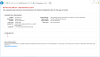
1588065742332.png

Showing 0Bytes?? but theres full content on that DP

Error log:

MP Control Manager detected management point is not responding to HTTP requests. The HTTP status code and text is 500, Internal Server Error.

Possible cause: Management point encountered an error when connecting to SQL Server.
Solution: Verify that the SQL Server is properly configured to allow Management Point access. Verify that management point computer account or the Management Point Database Connection Account is a member of Management Point Role (smsdbrole_MP) in the SQL Server database.

Possible cause: The SQL Server Service Principal Names (SPNs) are not registered correctly in Active Directory
Solution: Ensure SQL Server SPNs are correctly registered. Review Q829868.

Possible cause: Internet Information Services (IIS) isn't configured to listen on the ports over which the site is configured to communicate.
Solution: Verify that the designated Web Site is configured to use the same ports which the site is configured to use.

Possible cause: The designated Web Site is disabled in IIS.
Solution: Verify that the designated Web Site is enabled, and functioning properly.

Possible cause: The MP ISAPI Application Identity does not have the requisite logon privileges.
Solution: Verify that the account that the MP ISAPI is configured to run under has not been denied batch logon rights through group policy.

For more information, refer to Microsoft Knowledge Base article 838891.

I have removed and reinstated the Role
Removed Client on azure server and reinstalled
Rebooted
Primary site computer object is administrator on azure server with Service account too.

Clutching at straws!!

SMS_NOTIFICATION_SERVER

Notification Server on LKSAZSCCMCORPS1.LksSAZURE.COM failed to connect to the site database SCCM_GRP.

Possible cause: Notification Server failed to connect to the site database. Possible causes:

1. The network is temporally unavailable.

2. Firewall misconfiguration.

3. Authentication issues.

Verify that the site database is up and running.

To help identify the problem, see the bgbserver.log on the management point LKSAZSCCMCORPS1.LKSAZURE.COM.

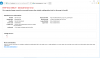
IIS page
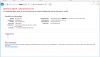
1588070955704.png
 

Attachments

  • 1588070921065.png
    1588070921065.png
    55.6 KB · Views: 54
Last edited:
Try below
-make sure that port 80 is opened
-Ran the command appcmd.exe Set config /Section:system.webserver/httpcompression /-[name=’xpress’] from path C:\Windows\System32\Inetsrv and rebooted the server.
 
appcmd.exe Set config /Section:system.webserver/httpcompression /-[name=’xpress’]
Ive tried this before , but not in the Inetsrv path , tried again and get below error
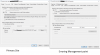
1588078824095.png
Port 80 is open

I cant put my finger on why this is happening, PKI certs?
 
This DP is one out of Six . 5 are configured for HTTPS and the one with the Problem is HTTP and im starting to wondering if its a PKI cert that is needed. But during the lock down and our Infra team being fuloughed I cant check with them regarding Certs and why 5 were done and not the 6th.

1588081685908.png
 
I made a backup of the Applicationhost.config file and used notepad++ to search in the file for anything of the below but the result came back with nothing

<scheme name="xpress" doStaticCompression="false" doDynamicCompression="true" dll="C:\Windows\system32\inetsrv\suscomp.dll" staticCompressionLevel="10" dynamicCompressionLevel="0" />

no mention of suscomp.dll either.

Ran the command line anyway (expecting it to fail) as the entry isnt there and it did fail

1588149422141.png
 
Last edited by a moderator:
have deletd the applicationhost.config file too in hope it will get recreated, it did not and still get the errors in MPControl.log

1588150528464.png
 
Still I have doubt on iis only.
And something messy happened with applicationhost.config .Try to check applicationhost.config and iis once again


yeah I think youre right with IIS somewhere. Ive messed about with it too much so might restore from backup and start again, taking a backup first haha
 
Ok so that backup is non existant. If I delete the applicationhost.config, what do I need to do for that to regenerate itself as a repair?
 
Hi Joe
Curious to know - is it done ?
I wanted to wait over the weekend to let the system iron itself out after making some changes, glad I did because I know have another issue.

Firstly, I deleted the applicationhost file from the troubled server and I copied over the file from a working DP with similar roles applied, I opened it and amended all the directories to point to the relevant areas. all sites and component status still critical, I ran the manual installation in command prompt to install the management point F:\SMS\bin\x64>rolesetup.exe /install /siteserver:MAN-SCCM-CM01 SMSMP 0

Which got me further and I was suprosed about as I had tried this 50 times with reboots in between etc so I put it down to the application host file being wrong.

Checked event viewer and the server was pending a reboot. bounce the server and wouldnt you beleve it everything went green. Over the moon I was untill Ive come in this morning to find that the server that was at 300GB content is now 4TB

1588581632864.png
 
Back
Top