MyNetworkinglife
Member
- Messages
- 6
- Solutions
- 1
- Reaction score
- 0
- Points
- 1
Hi All,
i have a weird one,
i have a mix of endpoints, that i use sccm to manage updates for
(Windows 10, Server 2012 R2 - 2019)
all have the latest client for my site install and all looks good
if i look at one of my 2016 or 2019 clients
the locations services log appears all good.
wuahandler.log shows a successful scan completion.
there is nothing in the updatesdeployment log.
updatesStore.log on client has no errors
on the sccm server
the wsusctrl.log is free of all errors
wsyncmgr.log is free of all error and appers healthy
in the wsus console - wsus knows of the client and its updates
if i run a software update scan report or a troubleshooting report the client does not appear in the reports.
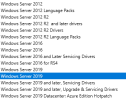
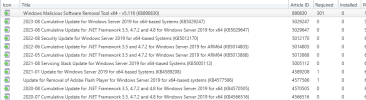
under the software update node > all software updates - Server 2019 appears twice under product categories.
see attached image.
i have reinstalled the sup multiple times and nothing i have come across seems to work
i have a weird one,
i have a mix of endpoints, that i use sccm to manage updates for
(Windows 10, Server 2012 R2 - 2019)
all have the latest client for my site install and all looks good
if i look at one of my 2016 or 2019 clients
the locations services log appears all good.
wuahandler.log shows a successful scan completion.
there is nothing in the updatesdeployment log.
updatesStore.log on client has no errors
on the sccm server
the wsusctrl.log is free of all errors
wsyncmgr.log is free of all error and appers healthy
in the wsus console - wsus knows of the client and its updates
if i run a software update scan report or a troubleshooting report the client does not appear in the reports.
under the software update node > all software updates - Server 2019 appears twice under product categories.
see attached image.
i have reinstalled the sup multiple times and nothing i have come across seems to work