Forums on Intune, SCCM, and Windows 11

Welcome to the forums. Register a free account today to become a member! Once signed in, you'll be able to participate on this site by adding your topics and posts, as well as connect with other members through your own private inbox!

PENDING SCCM Pull DP not getting packages

  • Thread starter Thread starter Hackmuss
  • Start date Start date
  • Replies Replies 6
  • Views Views 4K

Hackmuss

Member
Messages
17
Reaction score
3
Points
3
Hi All,
I have set up a new remote DP server, and set it as a pull DP for an existing one - the intention being that this will replace the original, and this seemed like the quickest and easiest way to get all the packages distributed to it before removing the original.
However, although it distributed the two default CM client packages OK, it fails when I try to distribute any other packages.
This is the error I am getting in the PkgXferMgr.log (with the server name redacted)
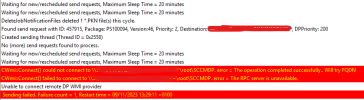
1699532647567.png
 
Hi All,
I have set up a new remote DP server, and set it as a pull DP for an existing one - the intention being that this will replace the original, and this seemed like the quickest and easiest way to get all the packages distributed to it before removing the original.
However, although it distributed the two default CM client packages OK, it fails when I try to distribute any other packages.
This is the error I am getting in the PkgXferMgr.log (with the server name redacted)

View attachment 5700
There error is clear, the site server can't connection to your new DP WMI. Have you confirmed permissions? Have to tested from the site server to the DP that it can connect to WMI?
 
What permissions? The computer account for the Primary Server is a member of the admins group on the DP - I'm not aware of any other permissions required.
I can run a powershell get-wmiobject query successfully from the Primary Server.
 
Last edited:
Good point, I was running it as my own admin account. Running it as SYSTEM account fails. What do I need to do to get these permissions? I'm sure I'm never had to do this before...
 
I would guess it is an firewall issue but it could be a WMI permissions issue. At least you have a starting point.
 
This is an interesting approach. I've not added a new DP as a pull DP from another DP. I've normally just added a new DP to our distribution group. SCCM then immediately starts distributing content to it.

Once the distribution is complete (monitored from the \Monitoring\Overview\Distribution Status\Distribution Point Group Status node) you can then direct clients to it using boundary group settings and remove the old distribution point from all boundary groups.
Once you've tested that clients can pull content from the new DP, you can then remove that role from the desired server.

As for the permissions issue--I too have become entangled in that mess. The simplest approach we've done is to create an AD group called "SCCM Site Servers" in our domain. We add all SCCM servers into that group, then use a GPO to add that group to the local administrators group on all site servers (rebooting each afterwards). That usually does the trick. As long as you're using the site server's account to install site roles on your remote DPs you should be all set (via the \Administration\Overview\Site Configuration\Servers and Site System Roles node, properties of the Site System role, General tab).

Garth knows what he's talking about though--if the above doesn't work it's definitely a firewall issue then. You can confirm by briefly disabling the firewall on the server(s) and restarting the SMS_Distribution_Manager component located in the \Monitoring\Overview\System Status\Component Status node. Monitor the distmgr.log on the primary site server for any errors.
 
Back
Top