Forums on Intune, SCCM, and Windows 11

Welcome to the forums. Register a free account today to become a member! Once signed in, you'll be able to participate on this site by adding your topics and posts, as well as connect with other members through your own private inbox!

SOLVED [SCCM] Office 365 Client Management feature is missing

Status
Not open for further replies.
Solution
We had to have Microsoft premier get involved and they found that the 'features' were turned off and had to use SQL Management studio to get them back.

Here are the final results from the Microsoft techs email. FYI: He stated that doing this on our own would put the system in to an unsupported state and is not advised.


PROBLEM:

=========

  • Office 365 Client Management and Windows 10 Servicing nodes are missing on SCCM console.

RESOLUTION:

===========

  • We see that Office 365 Client Management and Windows 10 Servicing nodes are missing on SCCM console.
  • We checked the SMSProv log and SMSAdminUi log but we did not see anything related to the above issue.
  • We checked the...
Hi Douglas
I think you will repair your SCCM installation, try this

Thanks for the suggestion, Sokoban. I was expecting something less traumatic. I'll take a look.

Thanks again.

This might seem like a dumb questions but are you a full admin? Do you have access to "All Objects" What feature have you enabled in CMCB?

Garth, it's a good question. I have tried in two admin users and the option still missing.

The role associated is Full Administrator. Do you have another thinking in your mind?

Thanks again!
 
I just realized that we too are missing that in our production console, our test console has it and was a clean build of 1806. Our production system is an upgrade from1702 and co-management is connected up to azure now as well. If that matters. A site repair is not the ideal option either.

Also I have tried to connect as several admin users, including the one used to build the environment from the get go and still nothing. Very perplexing.
 
Thanks for the suggestion, Sokoban. I was expecting something less traumatic. I'll take a look.

Thanks again.


Garth, it's a good question. I have tried in two admin users and the option still missing.

The role associated is Full Administrator. Do you have another thinking in your mind?

Thanks again!

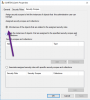
Make sure that your account has this option selected. Otherwise yo are not a full admins.

PW.png
 
Last edited by a moderator:
Sorry I'm out of ideas... it look like you will need to open a support case.
 
Sorry I'm out of ideas... it look like you will need to open a support case.

Thanks and that is what I am thinking as well. We have a consultant on hand whom we have engaged to see if they know of anything as well. Thanks again Garth.
 
We had to have Microsoft premier get involved and they found that the 'features' were turned off and had to use SQL Management studio to get them back.

Here are the final results from the Microsoft techs email. FYI: He stated that doing this on our own would put the system in to an unsupported state and is not advised.


PROBLEM:

=========

  • Office 365 Client Management and Windows 10 Servicing nodes are missing on SCCM console.

RESOLUTION:

===========

  • We see that Office 365 Client Management and Windows 10 Servicing nodes are missing on SCCM console.
  • We checked the SMSProv log and SMSAdminUi log but we did not see anything related to the above issue.
  • We checked the Database for features that are exposed or to be shown on SCCM console under the table “feature_EC” by running the below query.

select * from feature_EC where exposed = 0

  • We got 65 rows as output from the above query.
  • Copied all the 65 rows to our lab database and found 5 GUIDS needed to be enabled/exposed for the Nodes to show up.
  • Exposed those 5 GUIDS post which the nodes showed up on the SCCM console.
 
Solution
Status
Not open for further replies.

Forum statistics

Threads
7,157
Messages
27,935
Members
18,237
Latest member
Causal

Latest posts

Back
Top