Forums on Intune, SCCM, and Windows 11

Welcome to the forums. Register a free account today to become a member! Once signed in, you'll be able to participate on this site by adding your topics and posts, as well as connect with other members through your own private inbox!

PENDING SCCM notifications after Windows updates

  • Thread starter Thread starter cjacob
  • Start date Start date
  • Replies Replies 2
  • Views Views 2K

cjacob

Member
Messages
5
Reaction score
0
Points
1
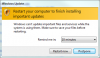
1525838312905.png

after Windows / office updates users are facing this notification which is a reminder to restart.

All restarts are suppressed after installation

my Question is there a way to manage it's appearance, and making the default max 4 hrs or more instead of 10 minutes???
 
The popup displayed is not from ConfigMgr client notification, do you have the same notification on another client?
 
Thank you for your answer, but

The environment is Windows 7, and Windows server 2008 R2 and Windows Server 2016

All clients with no exception have the same popup since the upgrade of SCCM from 1610 to 1710

Sorry Mate, it is from SCCM as during the display of it a process in task manager appears to be running scnotification.exe, plus Windows updates are disabled across the board and only permitted Via SCCM.

So the final conclusion is, this is from SCCM.

let us assume that it is not from SCCM, keeping in mind that Direct Windows updates from the internet is disabled in the environment, and no configurations in GPO's or others to deploy from WSUS, so what is its source, and how to control it ???????
 

Forum statistics

Threads
7,144
Messages
27,894
Members
18,191
Latest member
escdarck

Trending content

Back
Top