Hi,
This SCCM setup was working perfectly yesterday morning, I was then updating some application packages and no it won't image computers anymore, it boots into config manager on the client, asks for the password but then searches for a policy and fails.
I checked the SMSPXE log and the distmgr log, they both seem to be clear of errors but the SMSTS log on the client computer is full of errors,
AsyncCallback(); WINHTTP_CALLBACK_STATUS_SECURE_FAILURE Encountered
WINHTTP_CALLBACK_STATUS_FLAG_INVALID_CA is set
winhttp failed 80072f8f
retrying and ignoring date security failures
(this repeats about 4 times, then i get)
failed to send request (80072f8f)
failed to get client Identity (80072f8f)
Failed request for client
SyncTimeWithMP() failed 80072f8f
Failed to get time information from MP; https://our SCCM server name
Failed to select MP
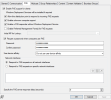
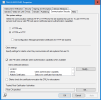
I have seen lots of help guides on the 80072f8f error, i checked the Certificates and even remade the CA cert as per guide on this site, i removed the check from the client check CRL, I changed from using the WDS PXE to SCCM PXE, and redeployed the task sequence and boot images.
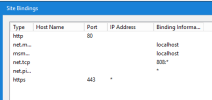
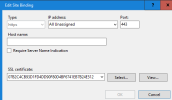
The IIS uses the same certificate for https bindings, although this gives me a security error when browsing this was doing this before and the imaging was working.
This SCCM setup was working perfectly yesterday morning, I was then updating some application packages and no it won't image computers anymore, it boots into config manager on the client, asks for the password but then searches for a policy and fails.
I checked the SMSPXE log and the distmgr log, they both seem to be clear of errors but the SMSTS log on the client computer is full of errors,
AsyncCallback(); WINHTTP_CALLBACK_STATUS_SECURE_FAILURE Encountered
WINHTTP_CALLBACK_STATUS_FLAG_INVALID_CA is set
winhttp failed 80072f8f
retrying and ignoring date security failures
(this repeats about 4 times, then i get)
failed to send request (80072f8f)
failed to get client Identity (80072f8f)
Failed request for client
SyncTimeWithMP() failed 80072f8f
Failed to get time information from MP; https://our SCCM server name
Failed to select MP
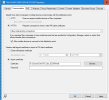
I have seen lots of help guides on the 80072f8f error, i checked the Certificates and even remade the CA cert as per guide on this site, i removed the check from the client check CRL, I changed from using the WDS PXE to SCCM PXE, and redeployed the task sequence and boot images.
The IIS uses the same certificate for https bindings, although this gives me a security error when browsing this was doing this before and the imaging was working.