Welcome to the forums. Register a free account today to become a member! Once signed in, you'll be able to participate on this site by adding your topics and posts, as well as connect with other members through your own private inbox!
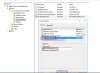
i am unable to re-image via sccm. can you tell me any one what is use of it (Boot\x64\wdsnbp.com) and how to find it, for more info find the attachment.
While you can configure DCHP per the link above (I did for a while, until it stopped working) you will have better luck adding the PXE host location to your switches.
Microsoft best practice states:
All DHCP broadcasts by client computers on User Data Protocol (UDP) port 67 should be forwarded directly to both the DHCP server and the Windows Deployment Services server.
If your switches already have a DHCP pointer configured you can set another one that points to your PXE host, clients will get IP addresses from the proper DHCP host and PXE will bot off the PXE server.
I think I have run into a similar issue you have but my environment and your environment might not be the same.
In my case I have issue with UEFI PXE boot. My Distribution Point and Client is on the same subnet and we have added Option 66 and 67 to DHCP option as most of setup. This only allowed BIOS PXE boot but not UEFI but don't know why. I ended up using Wireshark to track the PXE and DHCP packets to see what exactly is going on. It turns out somehow adding DHCP Option 66 and 67 caused PXE client to think Distribution Point's PXE server is the DHCP server and trying to obtain IP address from it.
Our solution to this issue is removing the Option 66 and 67. After it's removed PXE client was able to grab IP from correct DHCP server. After received IP it then get reply from Distribution Point to proceed to PXE boot.
There are two things you can check that will give you move hint on what is actually happening.
First thing is SMSPXE.log on your Distribution Point. See if your Client ever reached to the Distribution Point to request PXE content.
Second thing would be run a Wireshark on another computer on the subnet you are performing the PXE boot. Do a capture of "port 66 or port 67 or port 69 or port 4011." As DHCP packet is broad cast you will be able to pick up the chatter between that client, DHCP server and PXE server.
Thanks Henry,
In my case my PXE server (site servers) are on a different VLAN than my workstations, and oddly enough the PXE boot issue I had was on the server VLAN (same as the Site server/PXE boot server) once I added the helper IPs to my switches (Ubiquiti Edge Switches) and removed the DHCP options I no longer have problems booting into PXE from any VLAN