Forums on Intune, SCCM, and Windows 11

Welcome to the forums. Register a free account today to become a member! Once signed in, you'll be able to participate on this site by adding your topics and posts, as well as connect with other members through your own private inbox!

SOLVED SCCM Collection Creation using IP address range

  • Thread starter Thread starter Gokul
  • Start date Start date
  • Replies Replies 9
  • Views Views 26K

Gokul

Well-Known Member
Staff member
Messages
321
Solutions
4
Reaction score
58
Points
28
We can create SCCM collection using many method like OU based , Query based, manually adding etc. Its possible to create collection using IP address range too. I would like to share the same here .

While creating the collection you should mention the IP address range in the Query .

Code:
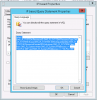
select SMS_R_SYSTEM.ResourceID,SMS_R_SYSTEM.ResourceType,SMS_R_SYSTEM.Name,SMS_R_SYSTEM.SMSUniqueIdentifier,SMS_R_SYSTEM.ResourceDomainORWorkgroup,SMS_R_SYSTEM.Client from SMS_R_System where SMS_R_System.IPAddresses >= "10.4.128.0" and SMS_R_System.IPAddresses <= "10.4.128.128"

Here i have created the collection using the IP address range - from 10.4.128.0 to 10.4.128.128
 
Yes you can create an collection based on an IP range BUT you can't using the >= option as an IP address is NOT a number, it is a string. Personally, I would use the gateway address to make the collection.
 
Hi Garth , Good Day to you .

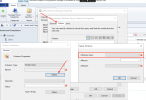
I have created the collection with same query and its works for me.As per my below query, there should be 11 machines should reflect in the collection.
1586276076853.png
1586276378553.png
 
Last edited:
Thanks Gokul and Garth for this information. Gokul's query worked for me in terms of collecting all devices with an IP address in that range. The problem is that it included a lot of internet based clients as well because it is using the IP address they obtained upon last logon to our internal company network/intranet. Is there a way for it to use the IP address that the internet based client last checked in with MP?

Garth, how would you do it with the gateway address. What attribute would you use in the query.

Thanks
 
The attribute is Default IP gateway.
Also kept in mint that you shouldn't be using the IP details from the R classes, instead use the HW inventory classes.
 
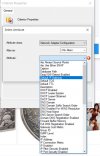
Thanks @Garth for your quick response. Unfortunately I'm new to this. How do I use the HW inventory classes. I'm assuming HW stands for hardware. I don't see that class in the list of "Attribute Classes". I've attached a screenshot of where I am looking in case I'm totally off base.
 

Attachments

  • Screen Shot 2021-02-04 at 11.32.00 AM.png
    Screen Shot 2021-02-04 at 11.32.00 AM.png
    197.1 KB · Views: 323
Is there a way to create a collection based on the IP address range? The below query does not work for me. It is pulling devices with other IPs as well.

select SMS_R_SYSTEM.ResourceID,SMS_R_SYSTEM.ResourceType,SMS_R_SYSTEM.Name,SMS_R_SYSTEM.SMSUniqueIdentifier,SMS_R_SYSTEM.ResourceDomainORWorkgroup,SMS_R_SYSTEM.Client from SMS_R_System inner join SMS_G_System_NETWORK_ADAPTER_CONFIGURATION on SMS_G_System_NETWORK_ADAPTER_CONFIGURATION.ResourceID = SMS_R_System.ResourceId where SMS_G_System_NETWORK_ADAPTER_CONFIGURATION.IPAddress >= "10.165.193.0" and SMS_G_System_NETWORK_ADAPTER_CONFIGURATION.IPAddress <= "10.165.193.63"
 
Is there a way to create a collection based on the IP address range? The below query does not work for me. It is pulling devices with other IPs as well.

select SMS_R_SYSTEM.ResourceID,SMS_R_SYSTEM.ResourceType,SMS_R_SYSTEM.Name,SMS_R_SYSTEM.SMSUniqueIdentifier,SMS_R_SYSTEM.ResourceDomainORWorkgroup,SMS_R_SYSTEM.Client from SMS_R_System inner join SMS_G_System_NETWORK_ADAPTER_CONFIGURATION on SMS_G_System_NETWORK_ADAPTER_CONFIGURATION.ResourceID = SMS_R_System.ResourceId where SMS_G_System_NETWORK_ADAPTER_CONFIGURATION.IPAddress >= "10.165.193.0" and SMS_G_System_NETWORK_ADAPTER_CONFIGURATION.IPAddress <= "10.165.193.63"
First off, IP Addresses are NOT numbers they are strings. As such, you might write your query to limit a string. This blog will explain what are 4 part numbers. https://askgarth.com/blog/what-is-a-4-part-version-numbers/
Once you understand that write your query is not a BIG deal but does take a bit to wrap you brain around the concept. I currently don't have a blog on doing this with WQL but There is one on SQL.
 

Forum statistics

Threads
7,144
Messages
27,894
Members
18,190
Latest member
escdarck

Trending content

Back
Top