Jans george
Active Member
- Messages
- 37
- Reaction score
- 0
- Points
- 6
Yeah I was using ranges for boundaries ( like an example ip ranges from 192.168.1.2 to 192.168.1.254) like that I was using boundary ranges .Are you only using up ranges for boundaries?
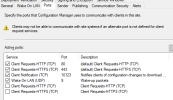
if everything is working fine, then what does it mapper that they should question marks? Is 10123 port open on the MP?There in no issues with applications pushing wise and bios configurations to the clients , all the things are working fine, but only the clients is showing question ?
yeah port 10123 open on the MP , all the things are working fine accept clients are showing question mark in place of green Tick mark on the sccm Consoleif everything is working fine, then what does it mapper that they should question marks? Is 10123 port open on the MP?
So if everything is working ok, what is the problem? e.g. why care if they have a question mark?yeah port 10123 open on the MP , all the things are working fine accept clients are showing question mark in place of green Tick mark on the sccm Console
Same question to you. If everything is working correctly, what does it matter about the question mark?Same issue i am also facing. I have checked all above mention point but still no luck.
Well if they do have a grey check mark, there is an issue with SCCM client connectivity to the MP, and I'm pretty sure application / software update / patching via SCCM will not work in this situation. SCCM client health is important, a grey question mark indicates some sort of problem with the SCCM client, so it definitely matters. I would start with the WBEMTest and WMI Explorer tools and verify that you can connect to the computer in question, rule out any WMI related issues. Also check the windows firewall rules configured on the target computer showing a grey check, verify that the rules configured are consistent with the rest of the computers that do show a healthy sccm client status (green check mark) to rule out any network / firewall related issues.Same question to you. If everything is working correctly, what does it matter about the question mark?
It is generally not the client itself that is the problem but either firewall or boundaries. Hence all the questions about both of these, long before the quoted statement. In all case you will notice that everyone says everything is fine. (Like you I don't believe it but... I have to take them at their word) Until they can give us a problem to work on there isn't much you can do. I always ask them what do the logs say (on both the client and servers), as they will reveal a treasure trove of information. You just need to read it and not just hunt for red lines. So...Well if they do have a grey check mark, there is an issue with SCCM client connectivity to the MP, and I'm pretty sure application / software update / patching via SCCM will not work in this situation. SCCM client health is important, a grey question mark indicates some sort of problem with the SCCM client, so it definitely matters. I would start with the WBEMTest and WMI Explorer tools and verify that you can connect to the computer in question, rule out any WMI related issues. Also check the windows firewall rules configured on the target computer showing a grey check, verify that the rules configured are consistent with the rest of the computers that do show a healthy sccm client status (green check mark) to rule out any network / firewall related issues.
Without them confirming, my guess is that if the client is reporting a grey question mark (unknown status) instead of a green check mark (healthy status), they're going to have issues with software/patch deployments among other SCCM related activities. The point you mentioned about the boundaries/boundary group issue is valid, that should be looked into. Firewall restrictions or missing / disabled firewall rules on the client itself might be contributing to this as well.It is generally not the client itself that is the problem but either firewall or boundaries. Hence all the questions about both of these, long before the quoted statement. In all case you will notice that everyone says everything is fine. (Like you I don't believe it but... I have to take them at their word) Until they can give us a problem to work on there isn't much you can do. I always ask them what do the logs say (on both the client and servers), as they will reveal a treasure trove of information. You just need to read it and not just hunt for red lines. So...


From the client machine open the Command prompt as administrator and execute these commands one by oneHello,
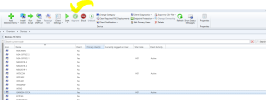
May i know why all the client are showing ? in the icon. Picture attached .
Most of the clients are Active and all operations are working fine. Kindly help.