Forums on Intune, SCCM, and Windows 11

Welcome to the forums. Register a free account today to become a member! Once signed in, you'll be able to participate on this site by adding your topics and posts, as well as connect with other members through your own private inbox!

SOLVED SCCM Client push install is not working

Status
Not open for further replies.

caspan

Member
Messages
11
Reaction score
0
Points
1
Hello,

I have an issue where Client Push does not seem to be pushing to clients without the configuration manager client, this used to run automatically and I believe that it stopped happening after I setup a new DP.

Any help would be appreciated.
 
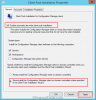
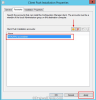
What method were are you using to push the sccm client agents ?. I guess its Automatic sitewide Client Push Installation method. If that is the case, check client push installation properties and check if client push installation account is fine (check if the account is active and password is fine). Additionally you need to check the ccm.log file. The ccm.log file is located on the server in server install dir>\logs. You'll see in that log if SCCM was able to trigger the installation. The you can check on client side in c:\windows\ccmsetup the client installation logs.

upload_2016-7-8_11-49-44.pngupload_2016-7-8_11-50-37.png
 
Hi Prajwal,

I tested that the admin account was active and that the password was fine. I used a single machine to test the individual push, (SSCM was displaying that the machine had the Client with a "Yes" in the column for the machine) however earlier had manually removed Configuration Manager from this machine and it failed to push Config Manager back to the same computer.
 
You need to check the ccm.log file. The ccm.log file is located on the server in server install dir>\logs. You'll see in that log if SCCM was able to trigger the installation. The you can check on client side in c:\windows\ccmsetup the client installation logs.
 
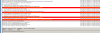
I'd like to piggy-back off this. I have similar issue. My clients have pushed out just fine. I have just a few that are not going through. Looking at the cmm log I found it shows my sccmadmin user account is being denied access. This has worked for 98% of the workstations, but not for the others. Is there something I can do to get the client pushed out? This is at a off-site location but other devices at that location received it just fine. Here is a screen shot of the cmmlog.
upload_2016-7-29_11-32-30.png
 
I'd like to piggy-back off this. I have similar issue. My clients have pushed out just fine. I have just a few that are not going through. Looking at the cmm log I found it shows my sccmadmin user account is being denied access. This has worked for 98% of the workstations, but not for the others. Is there something I can do to get the client pushed out? This is at a off-site location but other devices at that location received it just fine. Here is a screen shot of the cmmlog.
View attachment 450
This could be DNS related issue. Check if you can resolve the machine names. http://prajwaldesai.com/community/t...-logon32_logon_interactive-using-account.344/
 
Hi Prajwal,

Under Administration->Site Configuration->Servers and System Site Roles.
None of the Servers have Fallback Status Point Role, is this required in order to access the ccm.log?
 
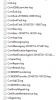
I can now view the ccm.log file, should I install the Configuration Manager Toolkit to view the log easier (with the Trace Log Tool)? What should I be looking for in the file?
 
Status
Not open for further replies.

Forum statistics

Threads
7,135
Messages
27,868
Members
18,159
Latest member
jordysmits
Back
Top