Welcome to the forums. Register a free account today to become a member! Once signed in, you'll be able to participate on this site by adding your topics and posts, as well as connect with other members through your own private inbox!
Here is the error I had when installing the sccm Client with Client Push Installation and I am asking for your help to solve it.
I am using the version of SCCM 1802.
Have you set the DP to run on HTTPS ?. If all distribution points and management points are configured for HTTPS client connections only, verify that the client computer has a valid client certificate.
How to verify if the client has a valid certificate? I use a self signed certificate. I distributed a certificate for client authentication to workstations but I still have the same error message
I configured a certificate for the distribution point and another for the client but I still have the same error message as you can see in the ccmsetup.log file in attach.
If you are using PKI certs, then a valid cert has to be assigned to the client machines. The DP "if running on HTTPS" should have a PKI cert assigned and not self signed cert. If you are using HTTPS at DP end and
Finally I managed to start the PXE and execute my task sequence successfully.
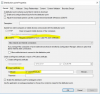
The problem was because the distribution point and the management point were configured to use https but it was the self signed certificate that was configured on the distribution point. As expected, the HKLM\Software\Microsoft\SMS\DP | ManagementPoints value is empty. This registry key would need to have a value like https://ServerName.DomainName
To resolve this problem, I correctly configure the distribution point with the PKI certificate
Before testing the deployment, I was reassured that the client computer does not exist in the sccm console as the deployment of the task sequence was done on the collection All unknown computers.
Please find the procedures I used for the KPI certificate through these links: