Forums on Intune, SCCM, and Windows 11

Welcome to the forums. Register a free account today to become a member! Once signed in, you'll be able to participate on this site by adding your topics and posts, as well as connect with other members through your own private inbox!

sccm client GPO

eagle876291

Member
Messages
16
Reaction score
0
Points
1
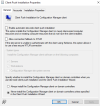
I setup a gpo to deploy sccm and I need to remove this first entry as it appears it doesnt work as expected. when selecting all task and remove which option do I choose? will it remove the clients that were previously installed as I dont want that to be the case. I just want to update the source URL


the only difference between both entries is just different source path. the top doestn work and the bottom one works perfectly, so I wanted to ask if ok to remove the first one but looks like that will do some uninstall work which I dont want to happen
 
Last edited:
Why aren't you using client push install instead of GPO here?
 
Thanks for the reply, I was hoping to get an answer of the question not explore other option to install client as GPO works perfectly fine
The problem with a GPO method is that it tattoo the registry and you need to clean that up. This can cause problems. Hence why almost no one use it. At the end of the day if you remove one and add one, the worse that will happen is everyone get uninstalled and reinstalled. (maybe) I would test this on one device and find out what happens.
 
The problem with a GPO method is that it tattoo the registry and you need to clean that up. This can cause problems. Hence why almost no one use it. At the end of the day if you remove one and add one, the worse that will happen is everyone get uninstalled and reinstalled. (maybe) I would test this on one device and find out what happens.
Thank you, can you guide me on the proper way to deploy agents to all systems?
 

Forum statistics

Threads
7,211
Messages
28,131
Members
18,400
Latest member
EightySix

Trending content

Back
Top