Forums on Intune, SCCM, and Windows 11

Welcome to the forums. Register a free account today to become a member! Once signed in, you'll be able to participate on this site by adding your topics and posts, as well as connect with other members through your own private inbox!

SOLVED sccm cache size is too small for requested content

Status
Not open for further replies.

Gangaiah Lakkakula

Active Member
Messages
33
Solutions
1
Reaction score
0
Points
6
Hi all,
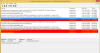
After successful distribution of application or package content over site distribution point and after deployment over particular client's collection, getting error in client's software system center. In client's system software center it showing Application/Package available to install, but it not installing because priory it is not downloading in client systems cache directory. I find some errors in clients C:\Windows\CCM\Logs\CAS.log file, can any one helps me in this issue, thanks advance.
 

Attachments

  • Err (1).png
    Err (1).png
    50.1 KB · Views: 55
You need to increase the cache size for SCCM client agent installed on the computer. You could try the below steps.
  • Go into Control Panel and choose Configuration Manager (32-bit).
  • Under the Advanced tab, click the Configure Settings button.
  • In the Temporary Program Download Folder section at the bottom, increase the Amount of disk space to use. Some software packages have been over 5 GB (5000 MB), so 10 GB (10,000 MB has worked for any current packages).
  • Click OK to save changes, and try re-running the software package.
 
You could also try the below script to increase the cache size. This is a powershell script.

set oUIResManager = createobject("UIResource.UIResourceMgr")
set oCache=oUIResManager.GetCacheInfo()
oCache.TotalSize=10240
 
Thanks Prajwal, I tried first solution in clients system. I increased cache size up to 8192 in configuration manager advance tab, but still i getting same error.
 
Thank you prajwal, I tried multiple times but here actual problem is in client's configuration manager software manager it showing Application and available time, when i select application and clicking on Installation label the respect content is not downloading in client, so due to this application installation failing on client, can you find attachment once, thanks
 

Attachments

  • Err.jpg
    Err.jpg
    112.1 KB · Views: 35
  • Err1.jpg
    Err1.jpg
    385.7 KB · Views: 36
  • err2.jpg
    err2.jpg
    425.2 KB · Views: 31
Last edited:
You could also try the below script to increase the cache size. This is a powershell script.

set oUIResManager = createobject("UIResource.UIResourceMgr")
set oCache=oUIResManager.GetCacheInfo()
oCache.TotalSize=10240

@Prajwal Desai : For running powershell command on client machine we need to import sccm related module on client machine. Can you please let us know how shall we import sccm module so that we can run the powershell script. Thanks in Advance!
 
Thanks @Prajwal Desai Cache problem is resolved . We have done mistake in Site SCCM server, where the respective shared directory having much data that is the reason we unable to download content to client machine.
 
Status
Not open for further replies.

Forum statistics

Threads
7,126
Messages
27,827
Members
18,138
Latest member
justkellen

Latest posts

Trending content

Back
Top