Forums on Intune, SCCM, and Windows 11

Welcome to the forums. Register a free account today to become a member! Once signed in, you'll be able to participate on this site by adding your topics and posts, as well as connect with other members through your own private inbox!

PENDING sccm applications not showing in software center

  • Thread starter Thread starter michaelj
  • Start date Start date
  • Replies Replies 10
  • Views Views 7K

michaelj

Member
Messages
18
Solutions
1
Reaction score
1
Points
3
Hello all, i am facing an issue with sccm version 2002 on a windows server 2012R2, where the applications does not appear on the client. I was able to deploy the version 5.089 of the clients to most of our machines, without any issue.
Clients are all with Windows 10 20H2.
I am deploying software based on AD security Group, either User oder Device based. Anyone any idea? From the logs i am not getting nowwhere. Siteserver ok as also the bounderies look ok.
For any hint i am gratefull. Thank you.
 
Solution
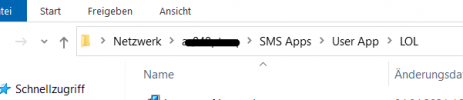
Hello all, to share the solution. I had System missing in Advance sharing from the apps folder. After adding it the packages went trough. Thank you all for your help.
I have this by the way on all packages. What is weired is that i was able to deply the new clientversion to our machines
 
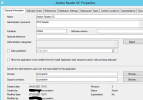
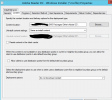
Did you checked the deployment type properties for your application ? Check if the path is correct on the Content tab and also check the Programs tab if the Installation program is correct.

DeploymentType.png

DeploymentType2.png
 
Hello JohnM, thank you for your reply. The path is correct. I also changed the path for testing to a diferent location, without sucess.
Dont know where to look at anymore :-(
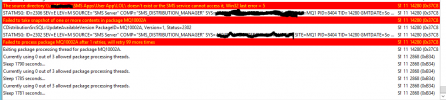
In the distmgr i only found this:
STATMSG: ID=2302 SEV=E LEV=M SOURCE="SMS Server" COMP="SMS_DISTRIBUTION_MANAGER" SYS="MYSCCMSERVR" SITE=MQ1 PID=2352 TID=7748 GMTDATE=Mi Apr 07 20:42:53.249 2021 ISTR0="Adobe Reader DC" ISTR1="MQ100025" ISTR2="" ISTR3="" ISTR4="" ISTR5="" ISTR6="" ISTR7="" ISTR8="" ISTR9="" NUMATTRS=1 AID0=400 AVAL0="MQ100025" $$<SMS_DISTRIBUTION_MANAGER><04-07-2021 21:42:53.249-60><thread=7748 (0x1E44)>
~Failed to process package MQ100025 after 0 retries, will retry 100 more times $$<SMS_DISTRIBUTION_MANAGER><04-07-2021 21:42:53.710-60><thread=7748 (0x1E44)>
~Exiting package processing thread for package MQ100025. $$<SMS_DISTRIBUTION_MANAGER><04-07-2021 21:42:53.713-60><thread=7748 (0x1E44)>
~Currently using 0 out of 3 allowed package processing threads. $$<SMS_DISTRIBUTION_MANAGER><04-07-2021 21:42:57.407-60><thread=7756 (0x1E4C)>
~Sleep 1826 seconds... $$<SMS_DISTRIBUTION_MANAGER><04-07-2021 21:42:57.408-60><thread=7756 (0x1E4C)>
~Currently using 0 out of 3 allowed package processing threads. $$<SMS_DISTRIBUTION_MANAGER><04-07-2021 21:43:01.931-60><thread=7756 (0x1E4C)>
~Sleep 1822 seconds... $$<SMS_DISTRIBUTION_MANAGER><04-07-2021 21:43:01.933-60><thread=7756 (0x1E4C)>
~Currently using 0 out of 3 allowed package processing threads. $$<SMS_DISTRIBUTION_MANAGER><04-07-2021 21:43:06.459-60><thread=7756 (0x1E4C)>
~Sleep 1817 seconds... $$<SMS_DISTRIBUTION_MANAGER><04-07-2021 21:43:06.643-60><thread=7756 (0x1E4C)>
 
Last edited:
Thats how the one of the Package looks like:
1617829026450.png
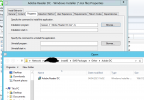
Following the Deployments Types properties:
1617829158037.png
1617829227240.png

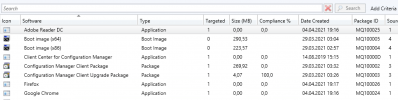
What i see is that also the size is not recognize of the package, not sure if this is an issue or not.
1617830457901.png
 
Last edited:
Can you create a device collection, drop in a single machine, deploy the app and confirm if it appears in Software center ?.
 
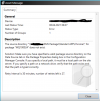
Hello Prajwal, first of all thank you for your reply. I tried the sugestion created a Collection with one machine. No sucess. Error is still the same. Its stated that the source directory is not accesible.
 
What i did so far:
Removed the DP and MP role. Add them back. Changed location for the Site Server Folders. Since then also the ccmsetup was working fine on the clients. All of the are up to date now.
Removed all packages again and created new collections. At the end. Issue is still the same. Also changed directory etc. No resolution so far. Anyone an idea.
 
Last edited:
1618167752389.png

But the package is accesible for all clients, as also form the site server.

1618168339974.png

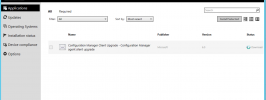
What is strange is that the ccm setup appears in Software Center.

1618168584150.png
 
Last edited:
Hello all, to share the solution. I had System missing in Advance sharing from the apps folder. After adding it the packages went trough. Thank you all for your help.
 
Solution

Forum statistics

Threads
7,182
Messages
28,011
Members
18,317
Latest member
rbushart

Trending content

Back
Top