Forums on Intune, SCCM, and Windows 11

Welcome to the forums. Register a free account today to become a member! Once signed in, you'll be able to participate on this site by adding your topics and posts, as well as connect with other members through your own private inbox!

SOLVED Sccm agent disappears after a time

  • Thread starter Thread starter moulouy
  • Start date Start date
  • Replies Replies 7
  • Views Views 1K
Status
Not open for further replies.

moulouy

Member
Messages
13
Reaction score
0
Points
1
Hello,
I have some technician laptop that are not always connected to our network, after a while time the agent is disappeared from the laptop.
why it happened? the devices are connected to 4G , sometimes they are back to our network , it must be recovered ? NOT?
Any idea ?
Regards,
ML.
 
Solution
ClientIDManagerStartup.log, CcmMessaging.log, CcmNotificationAgent.log & client.msi.log - can you check whether you see any error in these log files?

Suspect issue could be with DNS or duplicate GUID.
How are you confirming whether the CCMClient agent is uninstalled/removed from the device? Do you see any uninstall logs in this location? Also, check the timestamps of the install and uninstall log files. If the uninstall log timestamp is more recent, it means the agent was recently uninstalled. You can find an entry in Event Viewer that indicates who uninstalled the agent,

Log file : C:\Windows\ccmsetup\Logs
CCM setup home dir: C:\Windows\ccmsetup
 
the Client is not removed from the device, but on sccm console i see in the column Client NO or the device is completely not found.
After i put it again in the network, the device become actif after one hour.
So it means that if the device is not connected to our network for a week (7days) sccm lose the connection to device ?
 
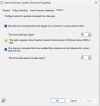
May be. Check the settings your company decided on in system discovery under Discovery Method - Administration > Overview > Hierarchy Configuration > Discovery Methods
1718624152540.png
 
The discover computer that have logged to the domain, is also set to 90days.
But the second setting is disabled.
 
ClientIDManagerStartup.log, CcmMessaging.log, CcmNotificationAgent.log & client.msi.log - can you check whether you see any error in these log files?

Suspect issue could be with DNS or duplicate GUID.
 
Last edited:
Solution
Status
Not open for further replies.
Back
Top