
Simon Fothersgill
New Member
- Messages
- 1
- Reaction score
- 1
- Points
- 3
I've seen a few people struggling with the 1602 sitting on Downloading and never completing, and not getting any answers. So I thought I would write a new thread for this:
The SCCM 1511 console shows that the 1602 update is available, but stays at Downloading forever.
I had already tried restarting the DMP_DOWNLOADER component and SMS_Executive services to no effect.
After re-reading the DMP_DOWNLOADER.log file, I should have paid more attention to the line:
There is web proxy configured for the connector
I had already checked that WINHTTP was configured for direct connection using:
NETSH WINHTTP SHOW PROXY
and checked that IE was not configured to use any proxy server. Also checked the Internet settings registry key for the System account, to make sure no proxy was set there.
On removing the Service Connection Point and re-adding it was obvious what I had missed - a proxy had been set here when the SCP was originally added:
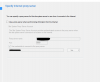
Creating the connector with no proxy resolved this download issue.
The SCCM 1511 console shows that the 1602 update is available, but stays at Downloading forever.
I had already tried restarting the DMP_DOWNLOADER component and SMS_Executive services to no effect.
After re-reading the DMP_DOWNLOADER.log file, I should have paid more attention to the line:
There is web proxy configured for the connector
I had already checked that WINHTTP was configured for direct connection using:
NETSH WINHTTP SHOW PROXY
and checked that IE was not configured to use any proxy server. Also checked the Internet settings registry key for the System account, to make sure no proxy was set there.
On removing the Service Connection Point and re-adding it was obvious what I had missed - a proxy had been set here when the SCP was originally added:
Creating the connector with no proxy resolved this download issue.


