Forums on Intune, SCCM, and Windows 11

Welcome to the forums. Register a free account today to become a member! Once signed in, you'll be able to participate on this site by adding your topics and posts, as well as connect with other members through your own private inbox!

SOLVED SCCM 0x800F0954 error when trying to install Windows features

  • Thread starter Thread starter gnuojoung
  • Start date Start date
  • Replies Replies 11
  • Views Views 6K
Status
Not open for further replies.

gnuojoung

Member
Messages
8
Solutions
1
Reaction score
0
Points
1
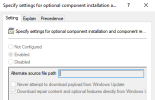
Unable to download and install Windows features when using default Local Group Policies added by Config Manager client and enabling "specify setting for optional component installation and component repair"

winupdategpo.PNG

specwu.PNG

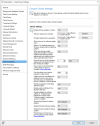
only way to fix 0x800F0954 is to work is by manually changing "Specify source services for specific classes of Windows Updates" to have Windows Updates set for Feature Updates
But this causes issues with downloading updates form Config Mgr and workstations don't show as required.
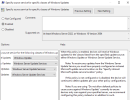
featuregpo.PNG
So i'm stuck with having one work and the other not.
what setting am i missing?
 
Solution
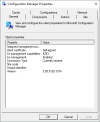
Updated to the fixed client, and we're still getting 0x800F0954
View attachment 6418
Never mind the KB does resolve the issue.
BUT you need to delete the following:
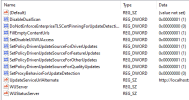
These values are under Windows Components > Windows Update > Manage updates offered from Windows Server Update Service. The corresponding registry location is HKEY_LOCAL_MACHINE\Software\Policies\Microsoft\Windows\WindowsUpdate.
  • SetPolicyDrivenUpdateSourceForDriverUpdates
  • SetPolicyDrivenUpdateSourceForFeatureUpdates
  • SetPolicyDrivenUpdateSourceForOtherUpdates
  • SetPolicyDrivenUpdateSourceForQualityUpdates
You can also then delete HKEY_LOCAL_MACHINE\Software\Policies\Microsoft\Windows\WindowsUpdate\AU
  • UseUpdateClassPolicySource
Hi,

Check this registry which could be causing the issue: HKLM\Software\Policies\Microsoft\Windows\WindowsUpdate\DoNotConnectToWindowsUpdateInternetLocations
 
Updated to the fixed client, and we're still getting 0x800F0954
View attachment 6418
Never mind the KB does resolve the issue.
BUT you need to delete the following:
These values are under Windows Components > Windows Update > Manage updates offered from Windows Server Update Service. The corresponding registry location is HKEY_LOCAL_MACHINE\Software\Policies\Microsoft\Windows\WindowsUpdate.
  • SetPolicyDrivenUpdateSourceForDriverUpdates
  • SetPolicyDrivenUpdateSourceForFeatureUpdates
  • SetPolicyDrivenUpdateSourceForOtherUpdates
  • SetPolicyDrivenUpdateSourceForQualityUpdates
You can also then delete HKEY_LOCAL_MACHINE\Software\Policies\Microsoft\Windows\WindowsUpdate\AU
  • UseUpdateClassPolicySource
 
Solution
Status
Not open for further replies.
Back
Top