Forums on Intune, SCCM, and Windows 11

Welcome to the forums. Register a free account today to become a member! Once signed in, you'll be able to participate on this site by adding your topics and posts, as well as connect with other members through your own private inbox!

PENDING Remove microsoft office 2010 tools installing Office 2016

micdam

Well-Known Member
Messages
99
Reaction score
1
Points
8
Hi,
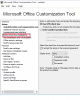
i deployed Office 2016 running the command setup.exe /admin. and customizing the installation,
in the step "remove previous intallatons" the behaviour is the default one (that is to say "remove all previous installations" ) but it doesn't remove Office 2013/2010 tool and Microsoft sharpoint workspace.

How have i to customize the installation to remove also those things?


upload_2017-6-1_14-51-56.png
Thankyou very much
 
i had read this article some time ago and Unfortunately it doesn't works.
i tried again and thisi is the execmgr.log both for package and for task sequence

Any suggest?

Thankyou very much


#####################################################
LOGS FOR PACKAGE


Checking content location C:\Windows\ccmcache\b for use execmgr 08/06/2017 16:09:59 3988 (0x0F94)
Successfully selected content location C:\Windows\ccmcache\b execmgr 08/06/2017 16:09:59 3988 (0x0F94)
Executing program as a script execmgr 08/06/2017 16:09:59 3988 (0x0F94)
Successfully prepared command line "C:\Windows\System32\cmd.exe" /C "CScriptNative.cmd //B //NoLogo "2013\OffScrub_O15msi.vbs" ALL /Quiet /NoCancel /Force /OSE" execmgr 08/06/2017 16:09:59 3988 (0x0F94)
Command line = "C:\Windows\System32\cmd.exe" /C "CScriptNative.cmd //B //NoLogo "2013\OffScrub_O15msi.vbs" ALL /Quiet /NoCancel /Force /OSE", Working Directory = C:\Windows\ccmcache\b\ execmgr 08/06/2017 16:09:59 3988 (0x0F94)
Running "C:\Windows\System32\cmd.exe" /C "CScriptNative.cmd //B //NoLogo "2013\OffScrub_O15msi.vbs" ALL /Quiet /NoCancel /Force /OSE" with 32bitLauncher execmgr 08/06/2017 16:09:59 3988 (0x0F94)
Created Process for the passed command line execmgr 08/06/2017 16:09:59 3988 (0x0F94)
Raising event:
[SMS_CodePage(850), SMS_LocaleID(1040)]
instance of SoftDistProgramStartedEvent
{
AdvertisementId = "PLM201AF";
ClientID = "GUID:60FF7EF7-8825-43D7-B2AD-0119A0709E58";
CommandLine = "\"C:\\Windows\\System32\\cmd.exe\" /C \"CScriptNative.cmd //B //NoLogo \"2013\\OffScrub_O15msi.vbs\" ALL /Quiet /NoCancel /Force /OSE\"";
DateTime = "20170608140959.488000+000";
MachineName = "NAME";
PackageName = "PLM001B7";
ProcessID = 1052;
ProgramName = "OffScrubO15";
SiteCode = "PLM";
ThreadID = 3988;
UserContext = "NT AUTHORITY\\SYSTEM";
WorkingDirectory = "C:\\Windows\\ccmcache\\b\\";
};
execmgr 08/06/2017 16:09:59 3988 (0x0F94)
Raised Program Started Event for Ad:PLM201AF, Package:PLM001B7, Program: OffScrubO15 execmgr 08/06/2017 16:09:59 3988 (0x0F94)
Program exit code 1 execmgr 08/06/2017 16:09:59 5980 (0x175C)
Looking for MIF file to get program status execmgr 08/06/2017 16:09:59 5980 (0x175C)
Script for Package:PLM001B7, Program: OffScrubO15 failed with exit code 1 execmgr 08/06/2017 16:09:59 5980 (0x175C)


LOGS for TASK SEQUENCE


Creating mandatory request for advert PLM201AE, program OffScrub10, package PLM001B7 execmgr 08/06/2017 16:06:19 6096 (0x17D0)
An existing MTC token was supplied, this execution request is not owner of MTC object. execmgr 08/06/2017 16:06:19 6096 (0x17D0)
Request a MTC task for execution request of package PLM001B7, program OffScrub10 with request id: {FD38AFE7-AC19-4E13-8423-AA1DB1341858} execmgr 08/06/2017 16:06:19 6096 (0x17D0)
Executing program "%SystemRoot%\System32\cmd.exe" /C "CScriptNative.cmd //B //NoLogo "2010\OffScrub10.vbs" ALL /Quiet /NoCancel /Force /OSE" in Admin context execmgr 08/06/2017 16:06:19 6096 (0x17D0)
Execution Request for advert PLM201AE package PLM001B7 program OffScrub10 state change from NotExist to NotifyExecution execmgr 08/06/2017 16:06:19 6096 (0x17D0)
MTC task with id {2062B95D-197B-4371-A00C-C35369FAF2B5}, changed state from 5 to 5 execmgr 08/06/2017 16:06:19 296 (0x0128)
Checking content location C:\_SMSTaskSequence\Packages\PLM001B7 for use execmgr 08/06/2017 16:06:19 6096 (0x17D0)
Successfully selected content location C:\_SMSTaskSequence\Packages\PLM001B7 execmgr 08/06/2017 16:06:19 6096 (0x17D0)
Executing program as a script execmgr 08/06/2017 16:06:19 6096 (0x17D0)
Successfully prepared command line "C:\Windows\System32\cmd.exe" /C "CScriptNative.cmd //B //NoLogo "2010\OffScrub10.vbs" ALL /Quiet /NoCancel /Force /OSE" execmgr 08/06/2017 16:06:19 6096 (0x17D0)
Command line = "C:\Windows\System32\cmd.exe" /C "CScriptNative.cmd //B //NoLogo "2010\OffScrub10.vbs" ALL /Quiet /NoCancel /Force /OSE", Working Directory = C:\_SMSTaskSequence\Packages\PLM001B7\ execmgr 08/06/2017 16:06:19 6096 (0x17D0)
Running "C:\Windows\System32\cmd.exe" /C "CScriptNative.cmd //B //NoLogo "2010\OffScrub10.vbs" ALL /Quiet /NoCancel /Force /OSE" with 32bitLauncher execmgr 08/06/2017 16:06:19 6096 (0x17D0)
Created Process for the passed command line execmgr 08/06/2017 16:06:20 6096 (0x17D0)
Raising event:
[SMS_CodePage(850), SMS_LocaleID(1040)]
instance of SoftDistProgramStartedEvent
{
AdvertisementId = "PLM201AE";
ClientID = "GUID:60FF7EF7-8825-43D7-B2AD-0119A0709E58";
CommandLine = "\"C:\\Windows\\System32\\cmd.exe\" /C \"CScriptNative.cmd //B //NoLogo \"2010\\OffScrub10.vbs\" ALL /Quiet /NoCancel /Force /OSE\"";
DateTime = "20170608140620.160000+000";
MachineName = "NAME";
PackageName = "PLM001B7";
ProcessID = 1052;
ProgramName = "OffScrub10";
SiteCode = "PLM";
ThreadID = 6096;
UserContext = "NT AUTHORITY\\SYSTEM";
WorkingDirectory = "C:\\_SMSTaskSequence\\Packages\\PLM001B7\\";
};
execmgr 08/06/2017 16:06:20 6096 (0x17D0)
Successfully submitted event to the Status Agent. execmgr 08/06/2017 16:06:20 6096 (0x17D0)
Raised Program Started Event for Ad:PLM201AE, Package:PLM001B7, Program: OffScrub10 execmgr 08/06/2017 16:06:20 6096 (0x17D0)
EvaluateRequestForExecution - Updated current running request execmgr 08/06/2017 16:06:20 6096 (0x17D0)
Program exit code 1 execmgr 08/06/2017 16:06:20 3476 (0x0D94)
Looking for MIF file to get program status execmgr 08/06/2017 16:06:20 3476 (0x0D94)


######################
 
Adding more info

i had some modifies to the package

the command line is cscript /nologo "2010\OffScrub10.vbs" ALL /Quiet /NoCancel /Force /OSE


the error is the same

###############################################################
Successfully prepared command line "C:\Windows\system32\cscript.exe" /nologo "2010\OffScrub10.vbs" ALL /Quiet /NoCancel /Force /OSE execmgr 12/06/2017 11:15:51 3876 (0x0F24)
Command line = "C:\Windows\system32\cscript.exe" /nologo "2010\OffScrub10.vbs" ALL /Quiet /NoCancel /Force /OSE, Working Directory = C:\Windows\ccmcache\9\ execmgr 12/06/2017 11:15:51 3876 (0x0F24)
Running "C:\Windows\system32\cscript.exe" /nologo "2010\OffScrub10.vbs" ALL /Quiet /NoCancel /Force /OSE with 32bitLauncher execmgr 12/06/2017 11:15:51 3876 (0x0F24)
Created Process for the passed command line execmgr 12/06/2017 11:15:51 3876 (0x0F24)
Raising event:
[SMS_CodePage(850), SMS_LocaleID(1040)]
instance of SoftDistProgramStartedEvent
{
AdvertisementId = "PLM201B5";
ClientID = "GUID:C50EA690-716F-48EC-A90F-6FD4BF0E4971";
CommandLine = "\"C:\\Windows\\system32\\cscript.exe\" /nologo \"2010\\OffScrub10.vbs\" ALL /Quiet /NoCancel /Force /OSE";
DateTime = "20170612091551.048000+000";
MachineName = "W7X64TESTVM";
PackageName = "PLM001B7";
ProcessID = 2684;
ProgramName = "OffScrub10";
SiteCode = "PLM";
ThreadID = 3876;
UserContext = "NT AUTHORITY\\SYSTEM";
WorkingDirectory = "C:\\Windows\\ccmcache\\9\\";
};
execmgr 12/06/2017 11:15:51 3876 (0x0F24)
Raised Program Started Event for Ad:PLM201B5, Package:PLM001B7, Program: OffScrub10 execmgr 12/06/2017 11:15:51 3876 (0x0F24)
Raising client SDK event for class CCM_Program, instance CCM_Program.PackageID="PLM001B7",ProgramID="OffScrub10", actionType 1l, value NULL, user NULL, session 4294967295l, level 0l, verbosity 30l execmgr 12/06/2017 11:15:51 3876 (0x0F24)
Raising client SDK event for class CCM_Program, instance CCM_Program.PackageID="PLM001B7",ProgramID="OffScrub10", actionType 1l, value , user NULL, session 4294967295l, level 0l, verbosity 30l execmgr 12/06/2017 11:15:51 3876 (0x0F24)
EvaluateRequestForExecution - Updated current running request execmgr 12/06/2017 11:15:51 3876 (0x0F24)
MTC task with id {B1D87C36-8112-4E39-A1F8-B0C0F4911D36}, changed state from 4 to 5 execmgr 12/06/2017 11:15:51 3904 (0x0F40)
Program exit code 1793 execmgr 12/06/2017 11:15:51 1100 (0x044C)
Looking for MIF file to get program status execmgr 12/06/2017 11:15:51 1100 (0x044C)
Script for Package:PLM001B7, Program: OffScrub10 failed with exit code 1793 execmgr 12/06/2017 11:15:51 1100 (0x044C)

#########################################################################################


but if i run the script mannually from C:\\Windows\\ccmcache\\9\\ it works fine


i think the problem is the working folder.

Have i to set the folder using a vbscript like this? Or there is a method to fix it creating the package?


' Determine script location for VBScript
Dim oFSO
Set oFSO = CreateObject("Scripting.FileSystemObject")
sScriptDir = oFSO.GetParentFolderName(WScript.ScriptFullName)


Hey,

Why not use this command in a batch file:

"%ProgramFiles%\Common Files\Microsoft Shared\OFFICE14\Office Setup Controller\setup.exe" /uninstall ProPlus /config "path to XML file"

I have my XML file setup like this:

<Configuration Product="ProPlus">
<Display Level="full" CompletionNotice="no" SuppressModal="yes" AcceptEula="yes" />
<Setting Id="SETUP_REBOOT" Value="NEVER" />
</Configuration>

Has worked well for me upgrading from 2010 to 2016.
 
Hey,

Why not use this command in a batch file:

"%ProgramFiles%\Common Files\Microsoft Shared\OFFICE14\Office Setup Controller\setup.exe" /uninstall ProPlus /config "path to XML file"

I have my XML file setup like this:

<Configuration Product="ProPlus">
<Display Level="full" CompletionNotice="no" SuppressModal="yes" AcceptEula="yes" />
<Setting Id="SETUP_REBOOT" Value="NEVER" />
</Configuration>

Has worked well for me upgrading from 2010 to 2016.


my Xml differs to yours only for this property: Display Level="full" but it doesn't work

i modified the script in http://www.deploymentmadscientist.c...-microsoft-office-2016-removing-old-versions/ commenting "CheckRegPermissions" function and setting ERROR_REBOOT_REQUIRED value to 0
 
Command line: "C:\Program Files (x86)\Common Files\Microsoft Shared\OFFICE14\Office Setup Controller\setup.exe" /uninstall PROPLUS /config "C:\Windows\TEMP\OffScrub10\config.xml" /dll OSETUP.DLL
 
Excuse me:


Command line: "C:\Program Files (x86)\Common Files\Microsoft Shared\OFFICE14\Office Setup Controller\setup.exe" /uninstall PROPLUS /config "C:\Windows\TEMP\OffScrub10\config.xml" /dll OSETUP.DLL
Parsing command line.
Handling command line option: /uninstall
Handling command line option: /config
Config XML file specified: C:\Windows\TEMP\OffScrub10\config.xml
Handling command line option: /dll


this is config.xml
<Configuration Product="PROPLUS">
<Display Level="None" CompletionNotice="No" SuppressModal="Yes" NoCancel="Yes" AcceptEula="Yes" />
<Logging Type="Verbose" Path="C:\WINDOWS\TEMP" Template="Microsoft Office PROPLUS Setup(*).txt" />
<Setting Id="SETUP_REBOOT" Value="Never" />
</Configuration>
 
Back
Top